# Build a Detuned Room Pad in Ableton Live
Create a soft, slowly swelling pad with three detuned saw waves, a gently moving low-pass filter, ensemble modulation and a diffuse room tail. Use **Operator → Chorus-Ensemble → Reverb**, available in **Live 12 Suite**.
[Play or download the finished sound](audio/Detuned-Room-Pad.webm) · [Complete settings](ALL_PARAMETERS.md)
## Step 1 — Blend three detuned saw waves
Load **Operator** in **Live 12 Suite**. The [starting settings](STARTING_STATE.md) collect the controls for this first step. Select **Algorithm 11**, the far-right diagram with all four oscillators connected independently to the output. Enable **A, B and C**; disable **D**. Choose **Saw D** for each active oscillator and leave the filter off for this first stage.
| Oscillator control | A | B | C |
|---|---:|---:|---:|
| Coarse | 1 | 1 | 1 |
| Fine | 0 | 1 | 8 |
| Level, displayed | −6.0 dB | −10 dB | −6.7 dB |
| Fixed | Off | Off | Off |
| Retrigger | Off | Off | Off |
| Phase | 0% | 0% | 0% |
| Feedback | 0% | 0% | 0% |
| Level < Velocity / Key | 0% / 0% | 0% / 0% | 0% / 0% |
| Frequency < Velocity | 0 | 0 | 0 |
All three oscillators play in the same register. The small Fine offsets create beating between them. **Operator's Fine numbers are frequency-ratio offsets, not cents.** Keep oscillator frequency quantization on.
Give A, B and C the same amplitude envelope:
| Envelope control | Value |
|---|---|
| Attack | 885 ms |
| Decay | 1.21 s |
| Sustain / Peak | 0 dB / 0 dB |
| Initial / End | −∞ dB / −∞ dB |
| Release | 3.00 s |
| Attack / Decay / Release slopes | 0% / 100% / 100% |
| Loop mode | None |
| Velocity-to-time / release modulation | 0% / 0% |
The slow attack rounds the beginning of a note. Maximum sustain keeps the tone alive while a key is held; the curved release fades after the key is lifted.
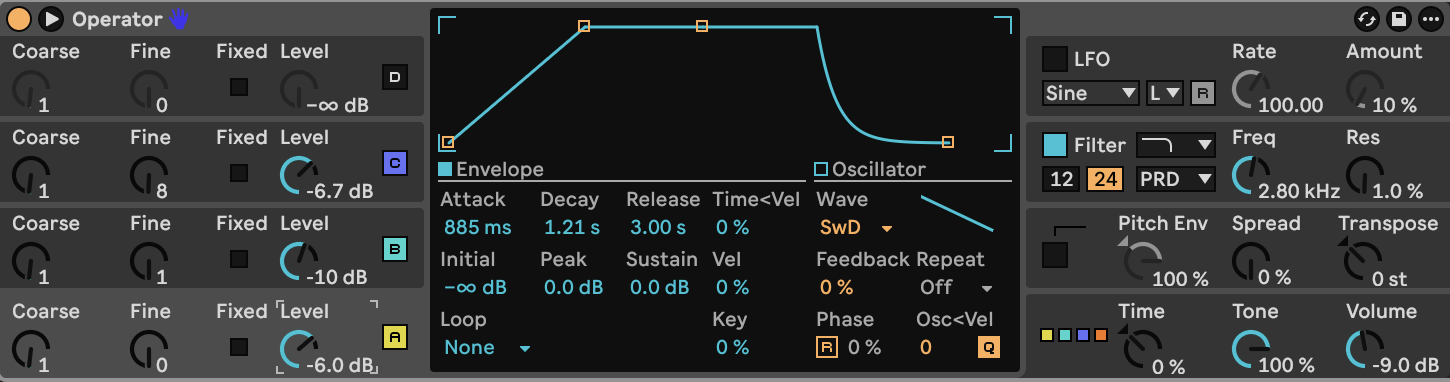
Set **Voices 6**, **Transpose 0 st**, **Tone 100%**, **Volume −9.0 dB**, **Spread 0%**, **Time 0%** and **Time < Key 0%**. Disable **Glide, Pitch Envelope and LFO**. Keep global retrigger off, interpolation and antialiasing on, pan centered, and both pan modulation amounts at zero. Use a pitch-bend range of **2 semitones**; leave other global controller destinations off.
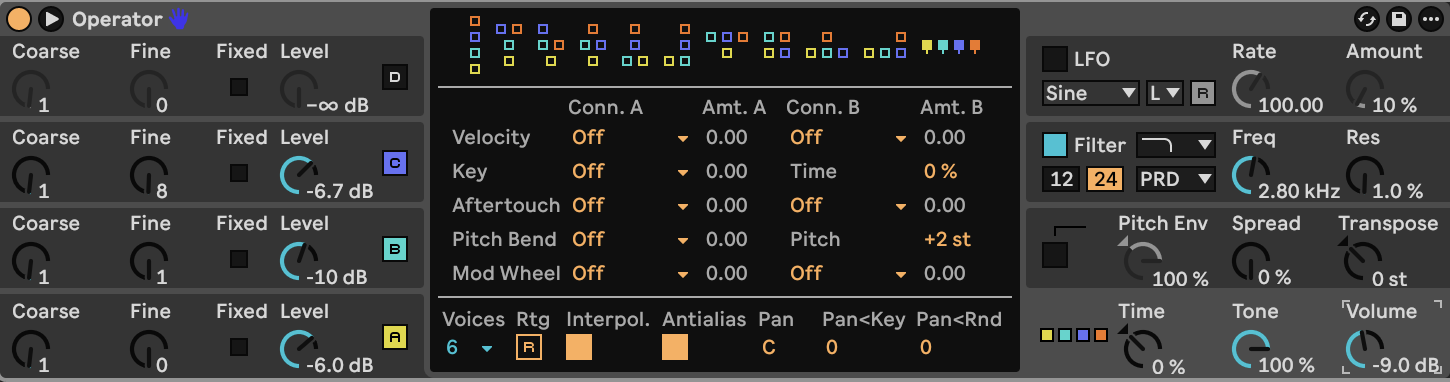
[Play or download step 1](audio/steps/step-01.webm)
## Step 2 — Soften the saws with a filter contour
Enable Operator's filter. Choose **Lowpass**, **24 dB**, and the **PRD** circuit.
| Filter control | Value |
|---|---|
| Frequency | 2.80 kHz |
| Resonance | 1.0% |
| Drive | 0.00 dB |
| Keyboard tracking | 100% |
| Velocity tracking | 0% |
| Envelope amount | 15% |
| LFO modulation | Off |
| Shaper | Off |
Set the filter envelope to **Attack 92.0 ms**, **Decay 4.30 s**, **Sustain 72%**, and **Release 3.00 s**. Use **Initial 0%**, **Peak 100%**, **End 0%**, **Attack Slope 0%**, **Decay and Release Slopes 100%**, and **Loop None**. Leave envelope velocity-time and release-velocity amounts at zero.
The filter opens ahead of the slower amplitude swell, then settles to a softer sustained tone. Full keyboard tracking carries the filter upward with higher notes. The low resonance keeps the contour smooth.
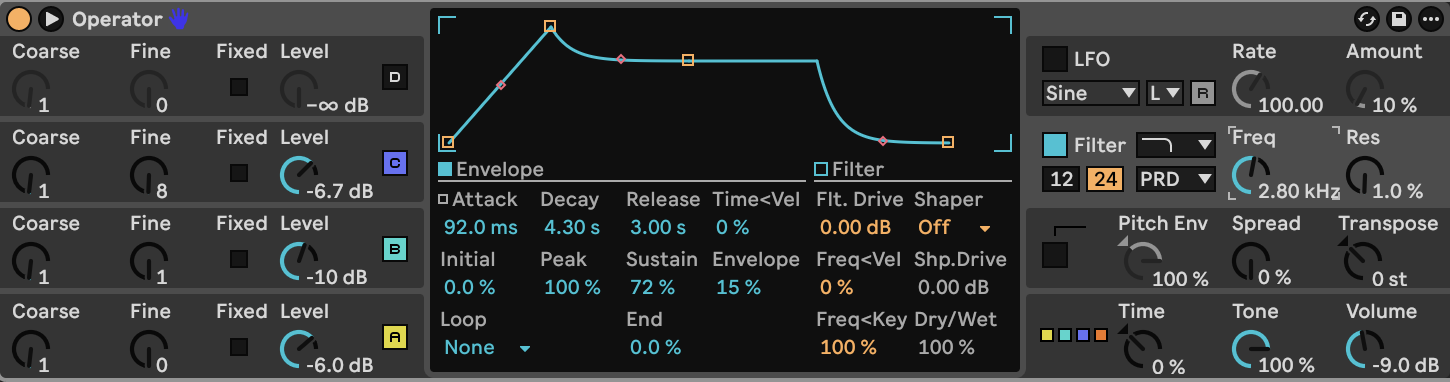
[Play or download step 2](audio/steps/step-02.webm)
## Step 3 — Spread the sound with ensemble modulation
Add **Chorus-Ensemble** after Operator.
| Control | Value |
|---|---|
| Mode | Ensemble |
| Rate | 0.60 Hz |
| Amount | 45% |
| Feedback | 0% |
| Feedback inversion | Off |
| Width | 100% |
| High-pass filter | Off |
| Warmth | 0% |
| Output | 0 dB |
| Dry/Wet | 52% |
Ensemble adds several moving, delayed versions of the sound. The wet blend widens the pad and makes the detuning less exposed. Keep feedback at zero for a smooth texture.
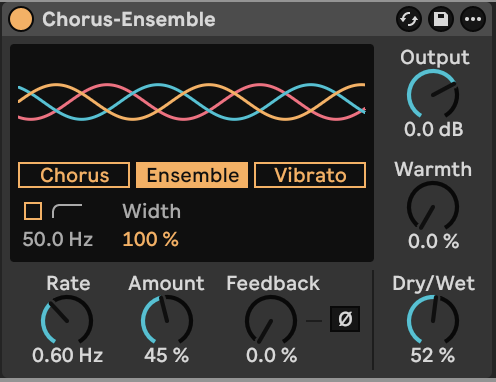
[Play or download step 3](audio/steps/step-03.webm)
## Step 4 — Add the room tail
Place **Reverb** last.
| Reverb control | Value |
|---|---|
| Predelay | 8.00 ms |
| Input Lo Cut / Hi Cut | Off / Off |
| Size | 65.00 |
| Size smoothing | Fast |
| Decay | 3.70 s |
| Stereo | 100.00 |
| Density | High |
| Reflect / Diffuse level | 0 dB / 0 dB |
| Dry/Wet | 50% |
| Early-reflection Spin | On |
| Spin rate / Amount | 0.30 Hz / 17.50 |
| Shape | 0.50 |
| Diffusion High | On, Shelf |
| High frequency / Gain | 4.50 kHz / 0.70 |
| Diffusion Low | Off |
| Diffusion / Scale | 60% / 40% |
| Chorus | On |
| Chorus rate / Amount | 0.02 Hz / 0.02 |
| Freeze | Off |
The short predelay connects the room to the pad. High-frequency damping softens the reverberation while the long decay fills the space around sustained notes. Reverb's chorus adds a small amount of movement to the diffuse tail.
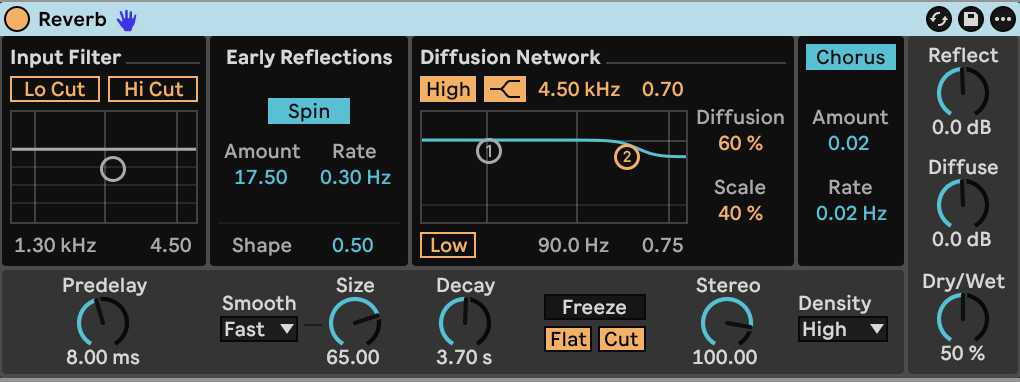
[Play or download step 4](audio/steps/step-04.webm)
Hold single notes to expose the slow beating, or play chords for a broad pad. Very short notes remain soft because they end before the amplitude attack reaches its peak. Velocity does not change the oscillator levels or filter cutoff in this patch.
[Operator control reference](https://www.ableton.com/en/manual/live-instrument-reference/#operator) · [Chorus-Ensemble and Reverb reference](https://www.ableton.com/en/manual/live-audio-effect-reference/)
## Downloads and settings
- [Finished audio, WebM](audio/Detuned-Room-Pad.webm)
- [Complete settings](ALL_PARAMETERS.md)
- [Starting settings](STARTING_STATE.md)
- [Markdown guide](BUILD_GUIDE.md)