# Build Faded Circuit Keys in Ableton Live
Shape a sustained, gently wobbling tone, narrow its colour with a band-pass filter, then add digital grain and a long room tail. Use **Drift → Auto Filter → Redux → Reverb** in **Live 12.4 Suite**.
[Play or download the finished sound — WebM](audio/Faded-Circuit-Keys.webm) · [Complete settings](ALL_PARAMETERS.md)
## Step 1 — Shape the sustained tone and its pitch movement
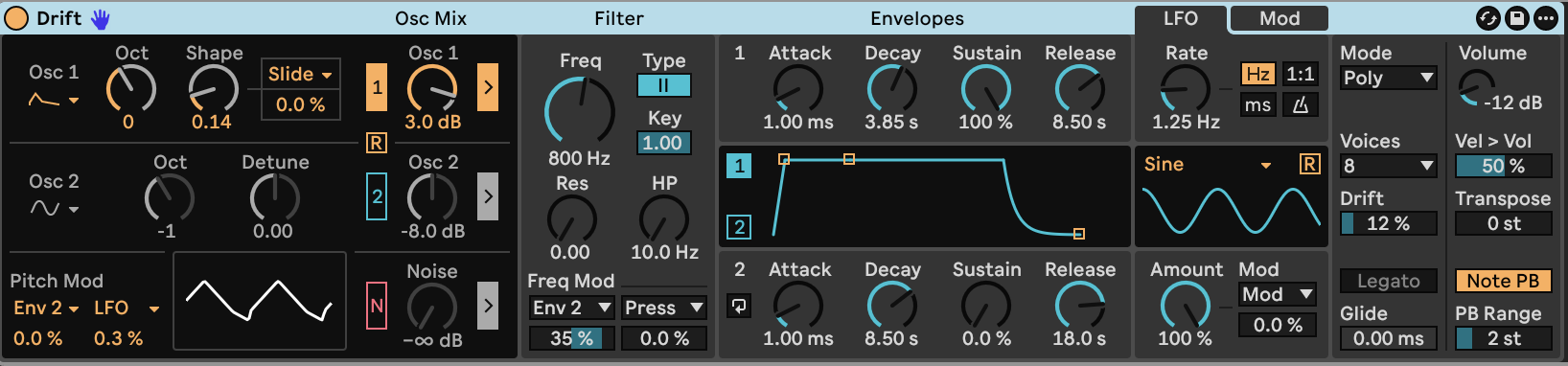
Load **Drift** and apply the [starting settings](STARTING_STATE.md). Use **Poly** mode with **8 voices**. Enable Oscillator 1, choose **Shark Tooth**, and set **Shape 0.14**, **Octave 0**, and **Gain +3.0 dB**. Turn Oscillator 2 and Noise Off. Keep Oscillator 1 routed through the filter.
Shark Tooth provides a mixed waveform with both rounded and sharper features. Shape changes its harmonic balance. The oscillator gain also affects the level entering Drift's filter.
Set **Volume −12 dB**, **Transpose 0 st**, **Velocity → Volume 50%**, **Drift 12%**, and **Poly Voice Depth 0%**. Keep **Glide 0 ms**, **Legato Off**, and **Oscillator Retrigger Off**. Use a **2 st** pitch-bend range.
Give Envelope 1 a sustained body and a long release:
| Envelope 1 control | Value |
|---|---:|
| Attack | 1.00 ms |
| Decay | 3.85 s |
| Sustain | 100% |
| Release | 8.50 s |
At full sustain, the decay segment does not reduce the held amplitude. The sound's gradual darkening comes from the filter envelope.
Choose lowpass **Type II**, set **LP Frequency 800 Hz**, **Resonance 0.00**, **HP Frequency 10 Hz**, and **Key → LPF 1.00**. Key tracking moves the lowpass cutoff with the played note.
Set **LP Modulation Source 1 Env 2**, **Amount 35%**. Keep the second filter modulation amount at **0%**. Use Envelope 2 in **Env** mode:
| Envelope 2 control | Value |
|---|---:|
| Attack | 1.00 ms |
| Decay | 8.50 s |
| Sustain | 0% |
| Release | 18.0 s |
Envelope 2 opens the lowpass at the strike and gradually closes it. Its long release prevents the filter from snapping shut when a note ends.
For the regular pitch wobble, choose **LFO Sine**, **Freq** mode, **Rate 1.25 Hz**, **Amount 100%**, and **Retrigger Off**. Set **Pitch Modulation Source 2 LFO**, **Amount 0.3%**. Keep Pitch Modulation Amount 1, Shape Modulation Amount, LFO Modulation Amount and all three general modulation amounts at **0%**. Drift adds a small amount of irregular variation around the repeating wobble.
[Play or download step 1 — WebM](audio/steps/step-01.webm)
## Step 2 — Blend in a narrower band of tone
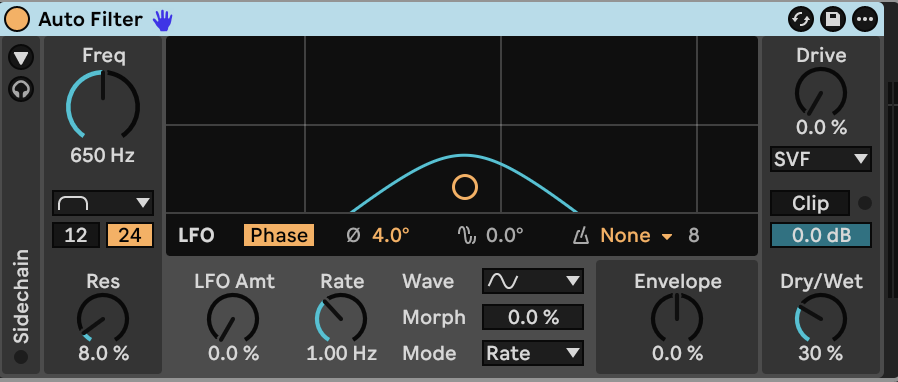
Add **Auto Filter** after Drift. Select **Band-pass**, **24 dB**, **SVF**, **Frequency 650 Hz**, **Resonance 8.0%**, and **Dry/Wet 30%**. Keep **Drive 0%**, **Output 0 dB**, **Soft Clip Off**, and both **LFO Amount** and **Envelope Amount 0%**. Leave the sidechain Off.
The band-pass branch concentrates the middle of the sound. Blending it with the dry signal keeps the low fundamental present. The cutoff is fixed, so its colour changes as notes move through its passband.
[Play or download step 2 — WebM](audio/steps/step-02.webm)
## Step 3 — Add a restrained digital edge
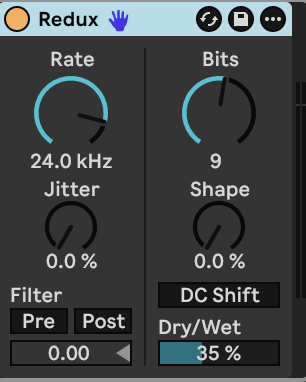
Place **Redux** after Auto Filter. Set **Rate 24.0 kHz**, **Bits 9**, **Jitter 0%**, **Shape 0%**, and **Dry/Wet 35%**. Turn **DC Shift**, **Pre-Filter** and **Post-Filter** Off.
Bit reduction roughens the quieter parts of the waveform, while the dry blend keeps the pitched body intact. Keep the preceding device gains as specified: the level entering Redux changes the strength of the quantization texture.
[Play or download step 3 — WebM](audio/steps/step-03.webm)
## Step 4 — Let the tone dissolve into a room
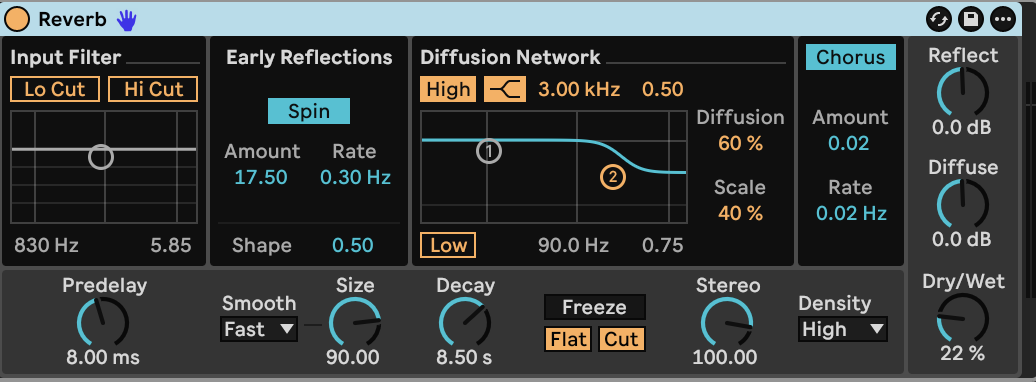
Add **Reverb** after Redux.
| Reverb control | Value |
|---|---|
| Predelay | 8.00 ms |
| Size / Smoothing | 90.00 / Fast |
| Decay | 8.50 s |
| Stereo | 100.00 |
| Density | High |
| Dry/Wet | 22% |
| Input Lo Cut / Hi Cut | Off / Off |
| Reflect / Diffuse level | 0 dB / 0 dB |
| Early-reflection Spin | On |
| Spin rate / Amount | 0.30 Hz / 17.50 |
| Early-reflection Shape | 0.50 |
| Diffusion High | On, Shelf |
| High frequency / Gain | 3.00 kHz / 0.50 |
| Diffusion Low | Off |
| Diffusion / Scale | 60% / 40% |
| Chorus | On |
| Chorus rate / Amount | 0.02 Hz / 0.02 |
| Freeze | Off |
The room adds width and carries the grain behind the direct tone. High-frequency damping makes the tail softer as it fades. The pitch movement creates gentle interference between the current note and its reverberation.
[Play or download step 4 — WebM](audio/steps/step-04.webm)
Hold a note to reveal the slow filter movement. Release it to hear the amplitude envelope and room continue together. A lighter touch lowers the level entering Redux; a stronger strike brings the tone forward. Up to eight voices can sound at once, including notes still in their release.
## Downloads and settings
- [Finished sound — WebM](audio/Faded-Circuit-Keys.webm)
- [Complete instrument and effect settings](ALL_PARAMETERS.md)
- [Drift starting settings](STARTING_STATE.md)
- [Build guide — Markdown](BUILD_GUIDE.md)
[Drift reference](https://www.ableton.com/en/manual/live-instrument-reference/#drift) · [Stock effects reference](https://www.ableton.com/en/manual/live-audio-effect-reference/)