# Build a Falling Spectral Lead in Ableton Live
Build a bright, falling synth lead with a wide, lingering tail using **Operator, Chorus-Ensemble, Delay, Reverb and Utility**. Build the instrument from scratch in **Live 12.4.5 Suite**.
Listen to the finished sound:
[Listen to the finished sound](audio/Falling-Spectral-Lead.webm) · [Read with audio players](/tutorials/falling-spectral-lead/)
Follow the ten steps in order. Use the audio examples and device screenshots alongside the settings.
## Step 1 — Start with Operator
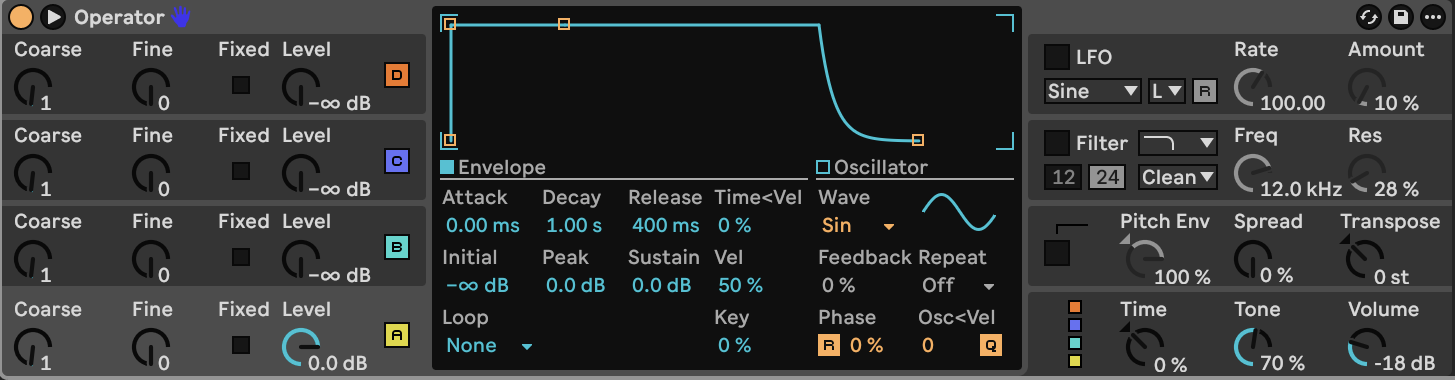
Load the plain **Operator** instrument. Start with oscillator A on **Sine**, Coarse **1**, Fine **0**, Level **0 dB**, and B/C/D levels at **−∞ dB**. Operator's output Volume is **−18 dB**, Spread **0%**, Transpose **0 st**, and Tone **70%**. Switch **Filter, LFO and Pitch Env Off**.
Use the initial amplitude envelopes: A has Attack **0 ms**, Decay **1.00 s**, Sustain **0 dB**, Release **400 ms**. B/C/D have Attack **0 ms**, Decay **400 ms**, Sustain **−24 dB**, Release **400 ms**. Their initial velocity amounts are **50%**. If your user-saved default differs, the [starting-state table](STARTING_STATE.md) lists every initial parameter.
At this stage, the sound is a plain sine note.
**Hear step 1:**
[Play or download step 1](audio/steps/step-01.webm)
## Step 2 — Layer the four oscillators
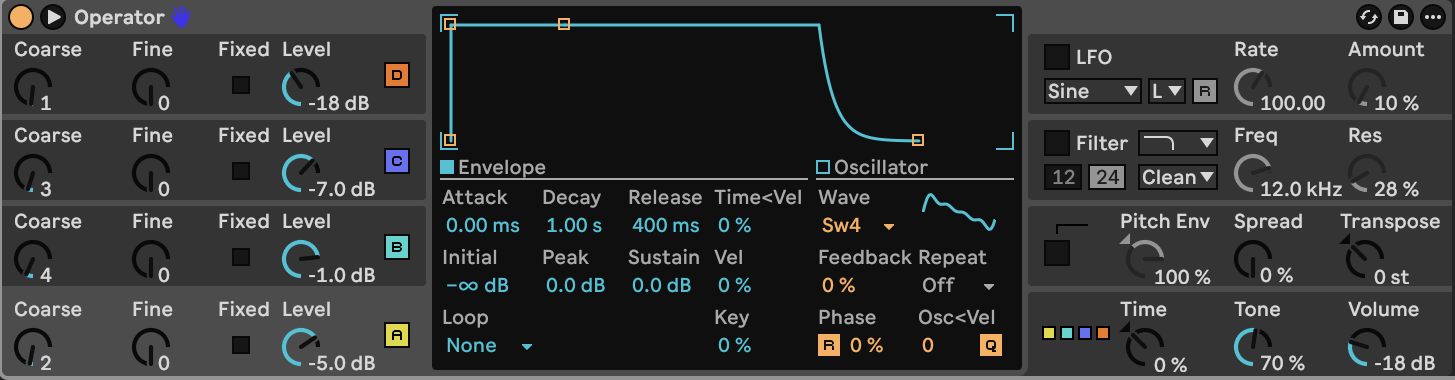
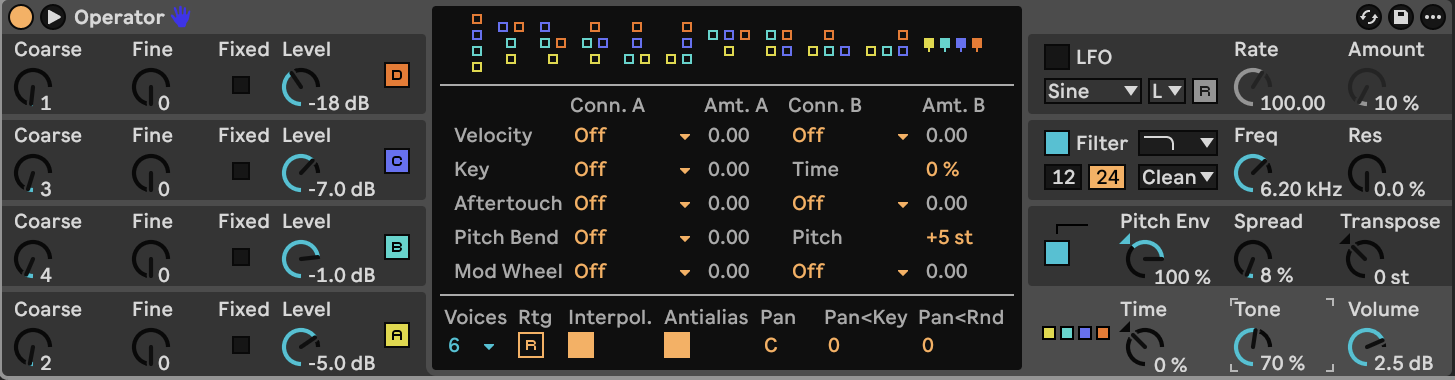
Click Operator's lower-right global section to reveal its algorithms. Choose **algorithm 11**, the far-right diagram showing **A, B, C, and D side by side**, all feeding the output. This is parallel additive layering. A different algorithm will cause frequency modulation and produce a different sound.
Enable all four oscillators. Click each oscillator's colored **A/B/C/D** area to edit its central panel. Choose the waveform from the Wave menu.
| Oscillator | Wave menu | Abbreviation in panel | Coarse | Fine | Level |
|---|---|---|---:|---:|---:|
| A | Saw 4 | Sw4 | 2 | 0 | −5.0 dB |
| B | Sine | Sin | 4 | 0 | −1.0 dB |
| C | Saw 3 | Sw3 | 3 | 0 | −7.0 dB |
| D | Saw 8 | Sw8 | 1 | 0 | −18 dB |
For **each oscillator**, set Fixed **Off**, frequency quantization **On**, oscillator retrigger **On**, phase **0%**, Feedback **0%**, frequency-to-velocity **0**, level-to-velocity **0%**, and level-to-key **0%**. Keep its pitch-envelope destination enabled. Fine is Operator's ratio fine control; it is not a conventional cents knob.
A establishes the strong even-harmonic body. B reinforces the fourth harmonic. C supplies the third harmonic and additional upper components. D supplies a quieter fundamental and fills out the spectrum.
**Hear step 2:**
[Play or download step 2](audio/steps/step-02.webm)
## Step 3 — Shape the amplitude envelopes
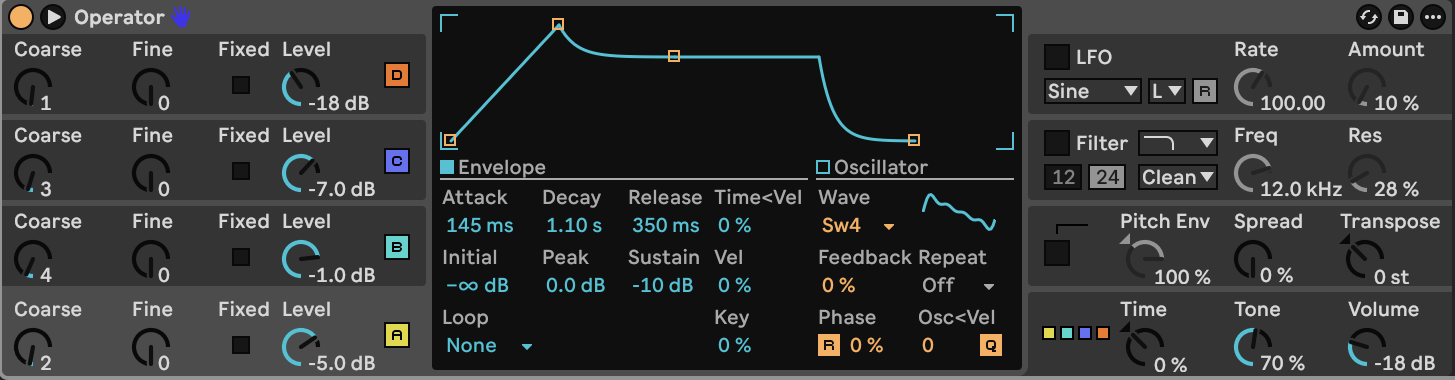
Repeat this table for **A, B, C, and D**. Editing A alone does not update B–D.
| Envelope control | Final value |
|---|---:|
| Attack | 145 ms |
| Initial | −∞ dB |
| Peak | 0.0 dB |
| Decay | 1.10 s |
| Sustain | −10 dB |
| Release | 350 ms |
| Loop mode | None |
| Repeat | Off |
| Time < Vel | 0% |
| Level < Vel / Vel | 0% |
| Level < Key / Key | 0% |
| Release < Vel | 0% |
The attack makes the note swell, while the nonzero sustain keeps the body alive during the hold. The release allows a short fade after note-off.
**Hear step 3:**
[Play or download step 3](audio/steps/step-03.webm)
## Step 4 — Add the downward pitch movement
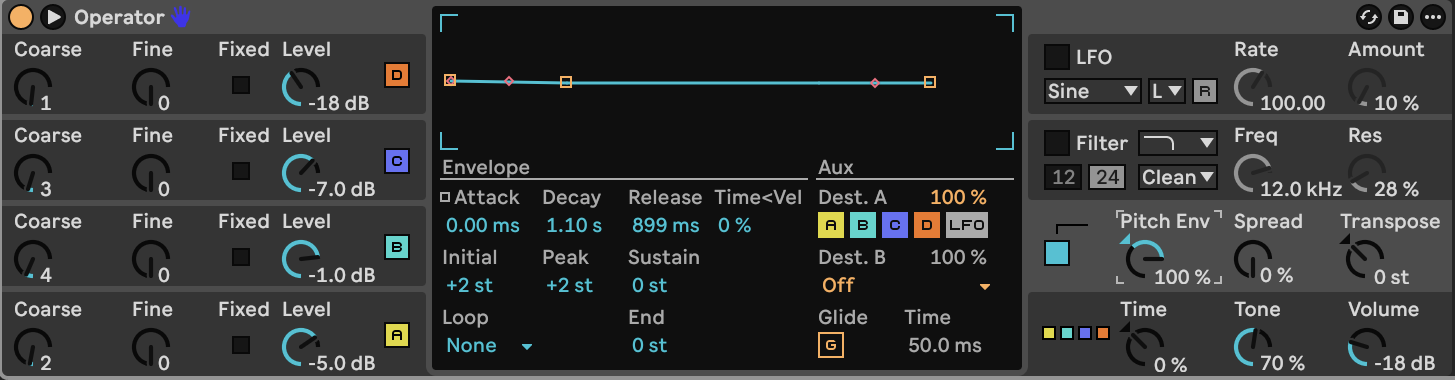
Enable **Pitch Env** in Operator's right-hand column, then click that section to display its envelope.
| Pitch-envelope control | Final value |
|---|---:|
| Amount | 100% |
| Initial / Peak | +2 st / +2 st |
| Attack | 0.00 ms |
| Decay | 1.10 s |
| Sustain / End | 0 st / 0 st |
| Release | 899 ms (approximately 900 ms) |
| Attack slope | 0% |
| Decay slope | 0% |
| Release slope | 100% |
| Loop mode / Repeat | None / Off |
| Time < Vel | 0% |
| Destination A | A, B, C and D enabled; amount 100% |
| Destination B | Off |
The pitch-envelope curve handles are visible in the graph. Select the decay segment and set its slope to **0%**; do not leave the initial 100% decay slope. The small two-semitone movement looks almost flat at the graph's full vertical scale.
Hold a **G4** note. The tone starts two semitones above the played note, then falls to G4 over **1.10 seconds**.
**Hear step 4:**
[Play or download step 4](audio/steps/step-04.webm)
## Step 5 — Set the filter and global controls
| Control | Final value |
|---|---:|
| Filter | On; Lowpass; Clean circuit; 24 dB/oct |
| Frequency / Resonance | 6.20 kHz / 0.0% |
| Filter Drive | 0.00 dB |
| Filter envelope amount | 0% |
| Filter < Key / Filter < Vel | 0% / 0% |
| Filter LFO modulation | Off |
| Shaper | Off |
| LFO | Off |
| Spread | 8% |
| Tone | 70% |
| Transpose / Time / Time < Key | 0 st / 0% / 0% |
| Output Volume | +2.5 dB |
| Panorama / Pan < Key / Pan < Rnd | Center / 0 / 0 |
| Voices | 6 |
| Global Rtg | Off |
| Interpolation / Antialias | On / On |
| Glide | Off; inactive time 50.0 ms |
| Pitch-bend range | +5 st |
Leave the global velocity, key, aftertouch and mod-wheel modulation amounts at zero. This keeps the patch at a consistent level across velocities.
**Hear step 5:**
[Play or download step 5](audio/steps/step-05.webm)
## Step 6 — Add Chorus-Ensemble
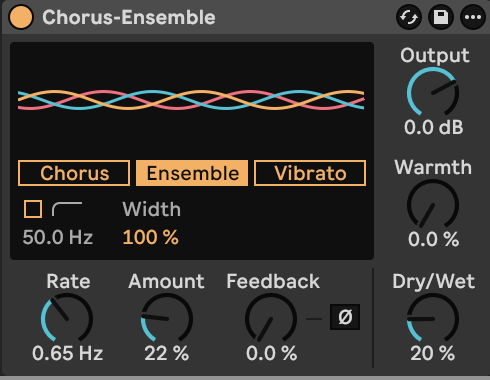
Place **Chorus-Ensemble immediately after Operator**.
| Control | Final value |
|---|---:|
| Mode | Ensemble |
| Rate | 0.65 Hz |
| Amount | 22% |
| Width | 100% |
| Feedback | 0.0%; inversion Off |
| High-pass | Off |
| Warmth | 0.0% |
| Output | 0.0 dB |
| Dry/Wet | 20% |
Use Ensemble mode for moving stereo layers. Leave inactive Chorus/Vibrato controls at the values in the [complete settings](ALL_PARAMETERS.md).
**Hear step 6:**
[Play or download step 6](audio/steps/step-06.webm)
## Step 7 — Add the stereo echoes
Place **Delay after Chorus-Ensemble**.
| Control | Final value |
|---|---:|
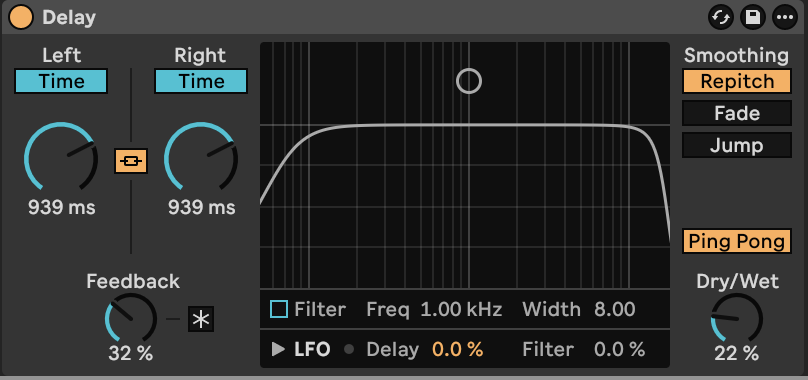
| Left / Right mode | Time / Time — both Sync switches Off |
| Link | On |
| Left / Right time | 939 ms / 939 ms |
| Feedback | 32% |
| Ping Pong | On |
| Smoothing | Repitch |
| Filter | Off |
| Freeze | Off |
| LFO > Delay / LFO > Filter | 0% / 0% |
| Dry/Wet | 22% |
Set both sides to **939 ms** for widely spaced echoes. Keep the filter Off so the repeats retain the bright tone.
The 32% feedback lets the echoes fade while preserving a spacious stereo trail.
**Hear step 7:**
[Play or download step 7](audio/steps/step-07.webm)
## Step 8 — Add the diffuse reverb
Place **Reverb after Delay**.
| Reverb section | Final settings |
|---|---|
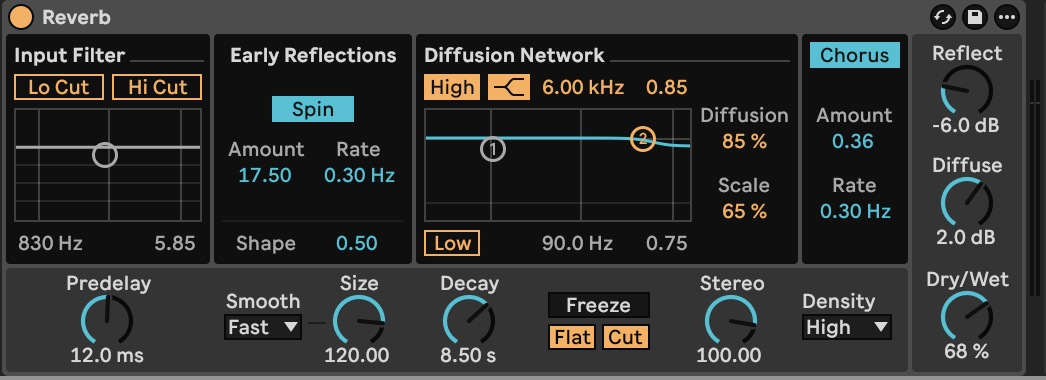
| Input Filter | Lo Cut Off; Hi Cut Off |
| Predelay | 12.0 ms |
| Early Reflections | Spin On; Rate 0.30 Hz; Amount 17.50; Shape 0.50 |
| Size | 120.00; smoothing Fast |
| Decay | 8.50 s |
| Diffusion / Scale | 85% / 65% |
| Density | High |
| Stereo | 100.00 |
| Diffusion High | On; Shelf; 6.00 kHz; multiplier 0.85 |
| Diffusion Low | Off |
| Chorus | On; Rate 0.30 Hz; Amount 0.36 |
| Reflect / Diffuse levels | −6.0 dB / +2.0 dB |
| Freeze | Off; Flat and Cut On but inactive while Freeze is Off |
| Dry/Wet | 68% |
The Diffusion High value **0.85** and Chorus Amount **0.36** are the unitless values shown by Reverb, not percentages. Keep the input cuts disabled: their initial settings otherwise remove too much of the bright source.
**Hear step 8:**
[Play or download step 8](audio/steps/step-08.webm)
## Step 9 — Set the final width and gain
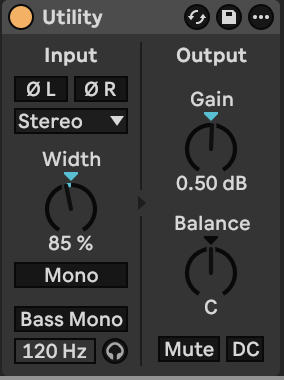
Add **Utility** after Reverb. Set **Input = Stereo**, **Width = 85%**, **Gain = +0.50 dB**, and **Balance = Center**. Keep both phase-invert switches, Mono, Bass Mono, Mute and DC filter **Off**.
The width adjustment focuses the stereo field slightly. The gain sets the final output level. Set the Width control to the displayed **85%** value.
The complete signal order is now:
**Operator → Chorus-Ensemble → Delay → Reverb → Utility**
**Hear step 9:**
[Play or download step 9](audio/steps/step-09.webm)
## Step 10 — Explore the finished sound
Play the finished instrument and let the echoes and reverb fade. Short notes emphasize the swell and falling pitch; longer notes settle into the sustained tone. Try other notes to explore how the harmonic layers change across the keyboard.
**Hear step 10:**
[Play or download step 10](audio/steps/step-10.webm)
## Downloads and settings
- [Finished synth lead](audio/Falling-Spectral-Lead.webm)
- [Complete device settings](ALL_PARAMETERS.md)
- [Operator starting settings](STARTING_STATE.md)