# Build a Hollow Pulse Bass in Ableton Live
Build a short, hollow bass with a bright edge, a swelling fourth harmonic and a dark finish. Use **Operator** in **Ableton Live 12 Suite**.
[Download the finished WebM](audio/Hollow-Pulse-Bass.webm) · [Read with audio players](/tutorials/hollow-pulse-bass/)
Follow the six steps in order. Use the audio examples and device screenshots alongside the settings.
## Step 1 — Make the rounded bass body
Load the plain **Operator** instrument in **Live 12 Suite**.
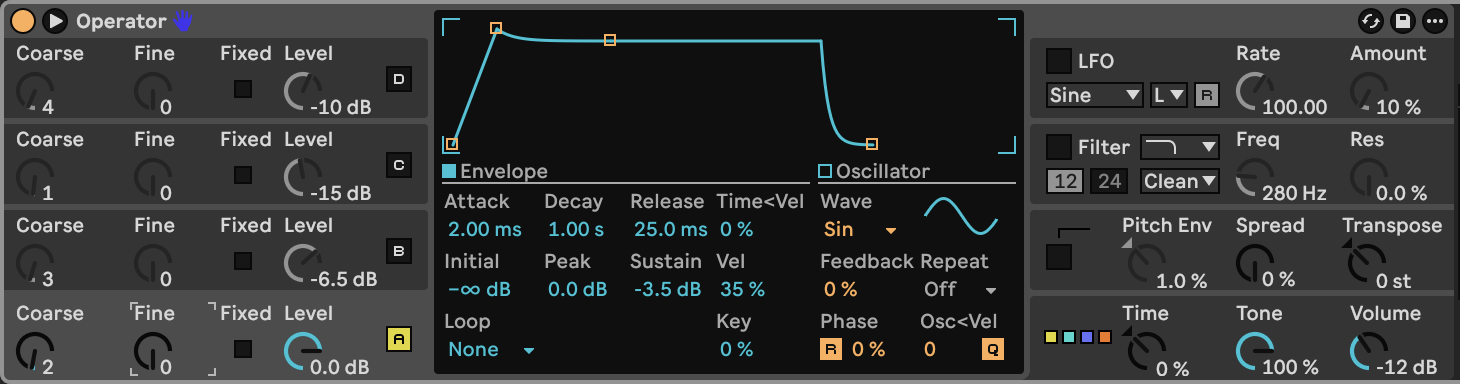
Click Operator's lower-right global area. Select **algorithm 11**, the far-right diagram with all four oscillators side by side. They now mix directly into the output. Set **Voices 6**, global **Retrig Off**, interpolation **On**, antialias **On**, Tone **100%**, Spread **0%**, Transpose **0 st**, and Volume **−12 dB**. Set Time, Time < Key, Pan < Key and Pan < Rnd to **0**. Leave the global modulation matrix at its default: velocity/aftertouch/mod-wheel connections Off, Key → Time at 0%, and Pitch Bend → Pitch at +5 st.
Switch **B, C, D, Filter, LFO and Pitch Env Off**. Enable **A**, choose **Sine**, and set Coarse **2**, Fine **0**, Level **0 dB**, Fixed **Off**, frequency quantization **On**, retrigger **On**, Phase **0%**, Feedback **0%**, frequency-to-velocity **0**, and Key **0%**.
Give A this envelope: Attack **2.00 ms**, Initial **−∞ dB**, Peak **0 dB**, Decay **1.00 s**, Sustain **−3.5 dB**, Release **25.0 ms**. Set Loop **None**, Repeat **Off**, Vel **35%**, Time < Vel **0%**, and Release < Vel **0%**. Retain the standard amplitude curves: linear attack and exponential decay/release. User-saved defaults can differ; the [starting settings](STARTING_STATE.md) collect these controls.
Although A is an octave above the played note, a quieter fundamental will join it in step 3.
**Hear step 1:**
[Play or download step 1 WebM](audio/steps/step-01.webm)
## Step 2 — Give the body a bright edge
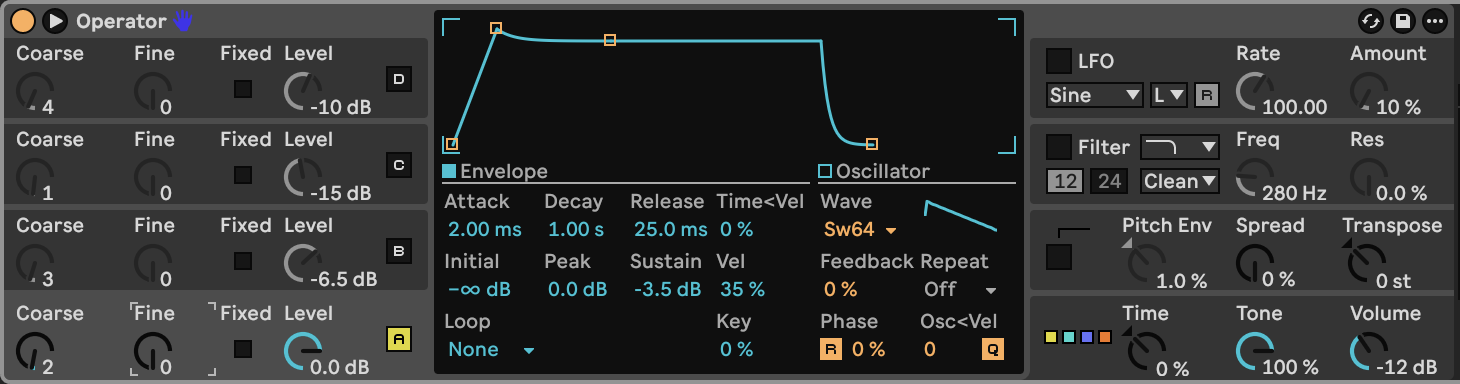
In A's central panel, change **Wave** from Sine to **Saw 64**, displayed as **Sw64**. Keep Coarse **2**, Level **0 dB** and the envelope from step 1.
This waveform adds a row of harmonics above the strong second harmonic. The sound is deliberately brighter here; the filter added later will close over the note.
**Hear step 2:**
[Play or download step 2 WebM](audio/steps/step-02.webm)
## Step 3 — Add the hollow harmonic balance
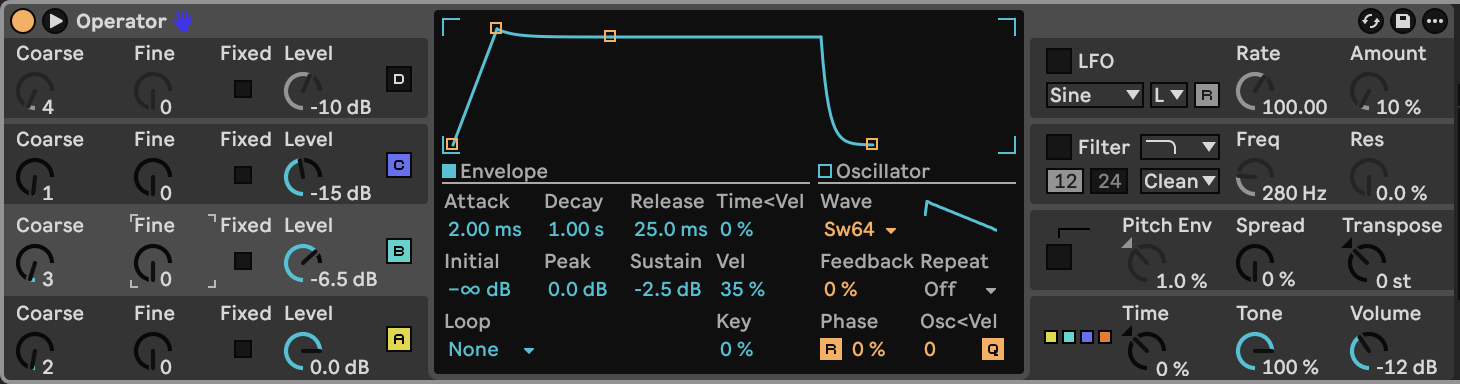
Enable **B and C** and set them separately:
| Control | B | C |
|---|---|---|
| Wave | Saw 64 / Sw64 | Sine / Sin |
| Coarse | 3 | 1 |
| Fine | 0 | 0 |
| Level | −6.5 dB | −15 dB |
| Attack | 2.00 ms | 2.00 ms |
| Decay | 1.00 s | 1.00 s |
| Sustain | −2.5 dB | −2.5 dB |
| Release | 25.0 ms | 25.0 ms |
For both oscillators, use Initial **−∞ dB**, Peak **0 dB**, Loop **None**, Repeat **Off**, Vel **35%**, Key **0%**, and both envelope time/release velocity amounts **0%**. Set Fixed **Off**, frequency quantization **On**, retrigger **On**, Phase **0%**, Feedback **0%**, and frequency-to-velocity **0**.
B adds the third harmonic and reinforces shared upper harmonics. C supplies the actual fundamental at a much lower level. The result stays hollow because the octave component remains stronger than the root.
**Hear step 3:**
[Play or download step 3 WebM](audio/steps/step-03.webm)
## Step 4 — Swell the fourth harmonic
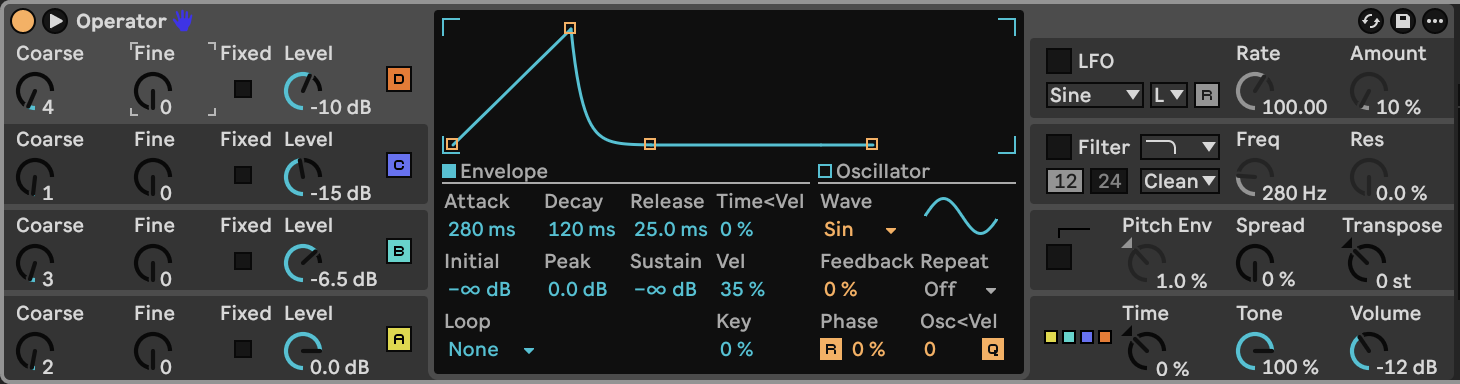
Enable **D**. Choose **Sine**, Coarse **4**, Fine **0**, and Level **−10 dB**. Use the same oscillator switches, phase, feedback and velocity settings as B and C.
Set D's envelope to Attack **280 ms**, Initial **−∞ dB**, Peak **0 dB**, Decay **120 ms**, Sustain **−∞ dB**, and Release **25.0 ms**. Keep Loop **None** and Repeat **Off**.
The slower attack brings in a rounded middle to the note. D then fades away, allowing the fourth harmonic to recede before the note ends. This is amplitude movement in one oscillator; no LFO is needed.
**Hear step 4:**
[Play or download step 4 WebM](audio/steps/step-04.webm)
## Step 5 — Close the filter over the note
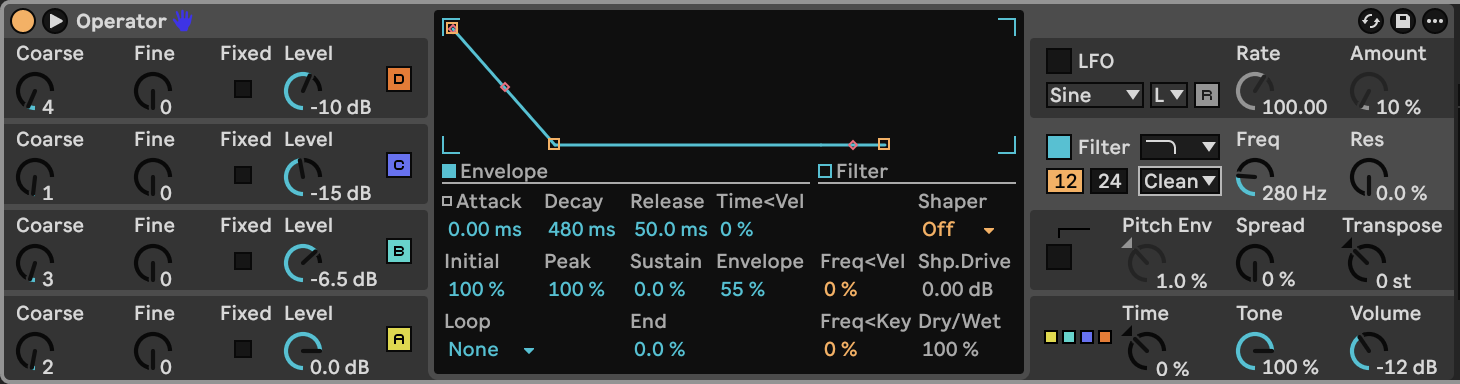
Enable **Filter**, then click its section to reveal the filter envelope. Select **Lowpass**, **12 dB**, **Clean**, Frequency **280 Hz**, and Resonance **0%**. Set frequency key tracking and frequency velocity tracking to **0%**. Keep filter LFO modulation **Off** and Shaper **Off**, with drive **0 dB** and Dry/Wet **100%**.
| Filter-envelope control | Value |
|---|---|
| Amount | 55% |
| Attack | 0.00 ms |
| Initial / Peak | 100% / 100% |
| Decay | 480 ms |
| Sustain / End | 0% / 0% |
| Release | 50.0 ms |
| Attack / Decay / Release slope | 0% / 0% / 100% |
| Loop / Repeat | None / Off |
| Time < Vel / Release < Vel | 0% / 0% |
The envelope raises the cutoff at the start, then brings it back toward 280 Hz. The bright edge gives way to the bass body over roughly half a second. The envelope's **Decay slope is 0%**: drag its middle slope handle until the segment is straight.
**Hear step 5:**
[Play or download step 5 WebM](audio/steps/step-05.webm)
## Step 6 — Add a small tuning drift and set the output
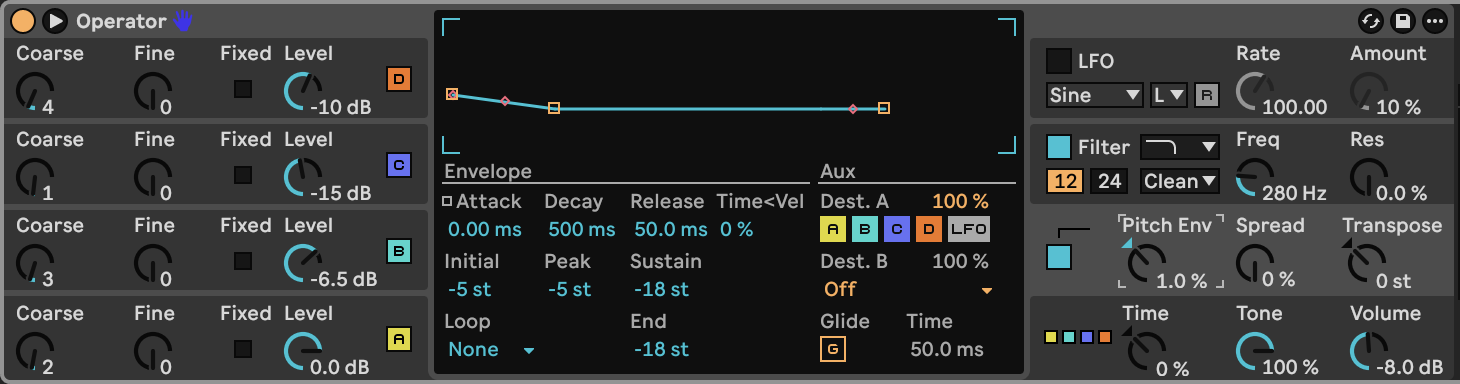
Enable **Pitch Env** and set its main Amount to **1.0%**. Click the pitch-envelope section; its central panel is labelled **Aux** in this version of Live.
| Pitch-envelope control | Value |
|---|---|
| Attack | 0.00 ms |
| Initial / Peak | −5 st / −5 st |
| Decay | 500 ms |
| Sustain / End | −18 st / −18 st |
| Release | 50.0 ms |
| Attack / Decay / Release slope | 0% / 0% / 100% |
| Destination A | A, B, C and D On; LFO Off |
| Destination A amount | 100% |
| Destination B | Off |
| Loop / Repeat | None / Off |
| Time < Vel / Release < Vel | 0% / 0% |
At **1%**, those envelope levels produce approximately **−5 cents at the start and −18 cents at the end**, rather than a large pitch fall. Set the Decay slope to **0%**, so the envelope segment is straight. Keep Glide **Off**, LFO **Off**, and Spread **0%**.
Raise Operator's Volume to **−8.0 dB**. The full signal order is now **four parallel oscillators → Operator's lowpass filter → Operator output**, with no extra effects.
**Hear step 6:**
[Play or download step 6 WebM](audio/steps/step-06.webm)
Play **C1 / MIDI 36**, **D#1 / MIDI 39** and **G1 / MIDI 43**. Lower D#1's velocity to **70** for a softer note. Hold notes longer to sustain A, B and C while D fades away. When playing far above this bass range, raise the filter cutoff to retain brightness.
## Downloads and settings
- [Finished audio, WebM](audio/Hollow-Pulse-Bass.webm)
- [Complete device settings](ALL_PARAMETERS.md)
- [Starting settings](STARTING_STATE.md)
- [Markdown guide](BUILD_GUIDE.md)