# Build a Lo-Fi Bell in Ableton Live
Blend a rounded low tone with two high triangle waves, then add a room, gentle panning and bit reduction. Use **Wavetable → Reverb → Auto Pan-Tremolo → Redux** in **Live 12.4 Suite**.
[Play or download the finished sound](audio/Lo-Fi-Bell.webm) · [Complete settings](ALL_PARAMETERS.md)
## Step 1 — Tune the three bell tones
Load **Wavetable** and apply the [starting settings](STARTING_STATE.md). Enable both main oscillators and **Sub**. Select **Basics → Basic Shapes** for each main oscillator, with **Position 25%**, the triangle region. Set both oscillator effect modes to **None** and keep both pans centered. Leave Filter 1 Off for this first step and Filter 2 Off throughout.
| Control | Oscillator 1 | Oscillator 2 |
|---|---:|---:|
| Wavetable | Basic Shapes | Basic Shapes |
| Position | 25% | 25% |
| Semitone | +16 st | +18 st |
| Detune | +30 ct | −15 ct |
| Gain | −21 dB | −24 dB |
| Effect mode | None | None |
Set **Sub Gain −6.0 dB**, **Sub Tone 12%**, and **Sub Octave −2**. Set global **Transpose +12 st**. These settings belong together: the sub ends up one octave below the played note, while the two main oscillators sit more than two octaves above it. Their unequal intervals create the bell character.
Set global **Volume −7.0 dB**, **Poly 5**, **Unison None** and **Glide 0 ms**. Keep global Time at **0%** and Global Mod Amount at **100%**.


Use this amplitude envelope:
| Amplitude control | Value |
|---|---|
| Attack | 1.00 ms |
| Decay | 4.30 s |
| Sustain | −38 dB |
| Release | 350 ms |
| Attack slope | 0% |
| Decay / Release slopes | 50% / 50% |
| Loop mode | None |
The fast attack gives a clear strike. The curved decay lets the bell fade while the key remains held; the quiet sustain leaves a faint residual tone. Set the three active MIDI modulation connections to **Velocity → Amp 50**, **Pitch Bend → Pitch +2 st**, and **Mod Wheel → Osc 1 Position 15**. Keep other matrix connections at zero. The mod wheel moves oscillator 1 toward a brighter waveform.

[Play or download step 1](audio/steps/step-01.webm)
## Step 2 — Round the sound with a low-pass filter
Enable **Filter 1**. Choose **Lowpass**, the **24 dB** slope and **PRD** circuit. Set **Frequency 1.65 kHz**, **Resonance 34%**, and **Drive 0.00 dB**. Use **Serial** filter routing and keep Filter 2 Off. Leave filter modulation from envelopes, LFOs and note pitch at zero.
The filter rounds the triangle harmonics and emphasizes the region around the high bell tones. Its fixed cutoff makes higher notes softer as more of their spectrum moves above the cutoff.

[Play or download step 2](audio/steps/step-02.webm)
## Step 3 — Surround the bell with a room
Add **Reverb** after Wavetable.
| Reverb control | Value |
|---|---|
| Predelay | 8.00 ms |
| Size / Smoothing | 80.00 / Fast |
| Decay | 1.50 s |
| Stereo | 100.00 |
| Density | High |
| Dry/Wet | 44% |
| Input Lo Cut / Hi Cut | Off / Off |
| Reflect / Diffuse level | 0 dB / 0 dB |
| Early-reflection Spin | On |
| Spin rate / Amount | 0.30 Hz / 17.50 |
| Early-reflection Shape | 0.50 |
| Diffusion High | On, Shelf |
| High frequency / Gain | 4.50 kHz / 0.70 |
| Diffusion Low | Off |
| Diffusion / Scale | 60% / 40% |
| Chorus | On |
| Chorus rate / Amount | 0.02 Hz / 0.02 |
| Freeze | Off |
The early reflections connect the bell to the room. The high-frequency damping softens the reverberation, and the short room decay leaves the instrument's longer envelope clear.
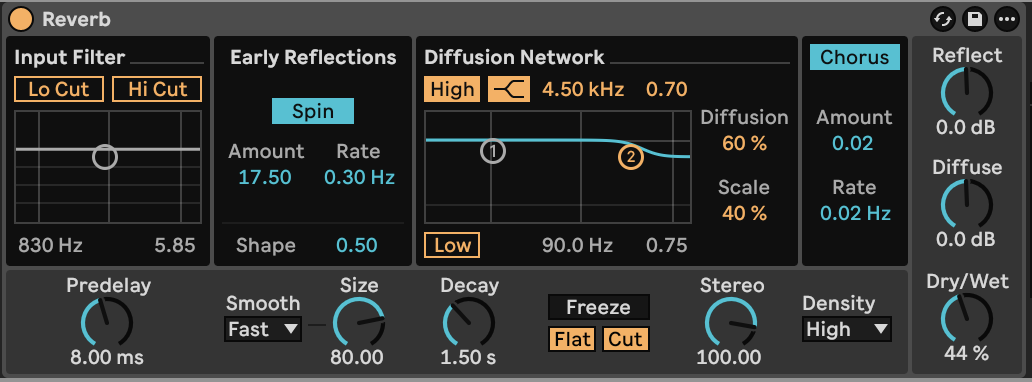
[Play or download step 3](audio/steps/step-03.webm)
## Step 4 — Add stereo motion and digital texture
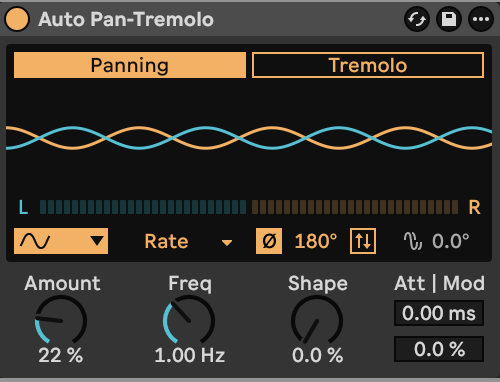
Place **Auto Pan-Tremolo** after Reverb. Select **Panning**, **Amount 22%**, **Sine**, **Time Mode Rate**, and **Frequency 1.00 Hz**. Choose **Stereo Mode Phase**, with **Phase 180°** and **Offset 0°**. Set Shape, Attack Time and Dynamic Modulation to zero; leave Invert, Harmonic and Vintage Off.
The small panning amount moves the bell and its room together without spreading them across the entire stereo field.
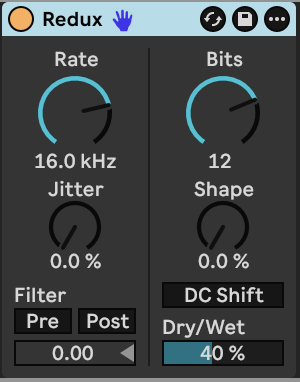
Add **Redux** last. Set **Sample Rate 16.0 kHz**, **Bit Depth 12**, and **Dry/Wet 40%**. Keep **Jitter 0%**, **Shape 0%**, **DC Shift Off**, and both **Pre-Filter and Post-Filter Off**.
The lower sample rate introduces additional high-frequency tones, while bit reduction roughens the quieter part of the decay. The dry blend retains the rounded bell underneath.
[Play or download step 4](audio/steps/step-04.webm)
Use a light touch for quieter bells, or higher velocity for a stronger strike. Hold notes to reveal the long decay and quiet sustain. Chords combine the low fundamentals with the closely spaced high partials. Up to five notes can sound at once. Raise the mod wheel to brighten the first high oscillator.
[Wavetable reference](https://www.ableton.com/en/manual/live-instrument-reference/#wavetable) · [Stock effects reference](https://www.ableton.com/en/manual/live-audio-effect-reference/)
## Downloads and settings
- [Finished sound — WebM](audio/Lo-Fi-Bell.webm)
- [Complete instrument and effect settings](ALL_PARAMETERS.md)
- [Wavetable starting settings](STARTING_STATE.md)
- [Build guide — Markdown](BUILD_GUIDE.md)