# Build Resonant Octave Mist in Ableton Live
Create a slowly swelling, slightly unstable tone with quiet octave echoes and a dark, spacious tail. Use **Drift → Shifter → Shifter → Reverb** in Ableton Live 12.4 Suite.
[Play or download the finished sound — WebM](audio/Resonant-Octave-Mist.webm) · [Complete settings](ALL_PARAMETERS.md)
## Step 1 — Make a singing filter in Drift
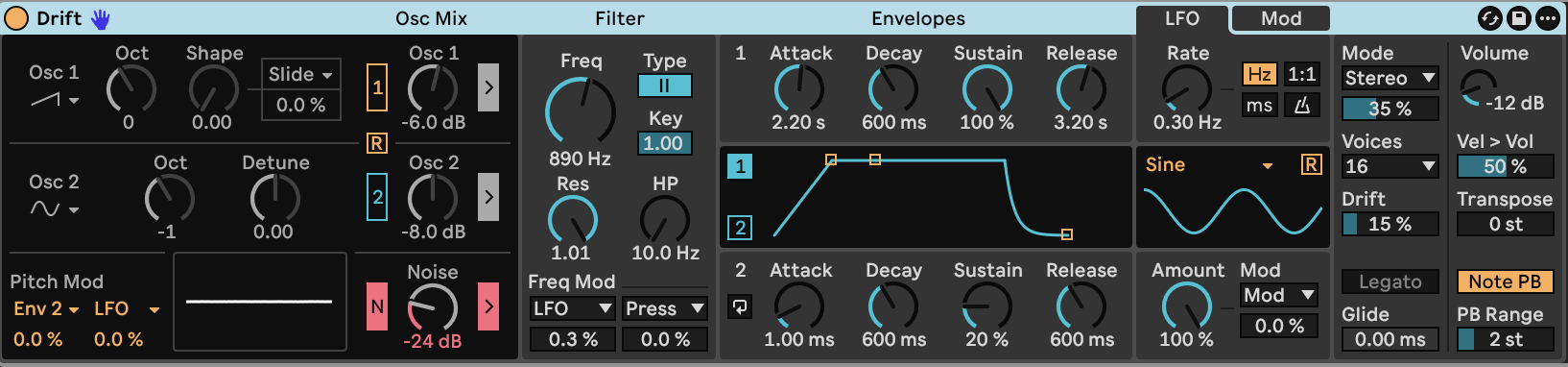
Load **Drift** and apply the [starting settings](STARTING_STATE.md). Turn **Osc 1** and **Osc 2** Off. Keep **Noise** On, set its gain to **−24 dB**, and enable its filter-routing arrow.
Set the filter to **Type II**, **Freq 890 Hz**, **Res 1.01** at its maximum, and **HP 10.0 Hz**. Set **Key 1.00**. At this resonance setting, the filter creates a narrow, singing tone from the noise. The cutoff sets the pitch of that tone; key tracking moves it with the keyboard. The main tone sits roughly one octave above the played note.
Shape the swell with **Envelope 1**:
| Control | Value |
|---|---:|
| Attack | 2.20 s |
| Decay | 600 ms |
| Sustain | 100% |
| Release | 3.20 s |
The long attack makes the tone emerge gradually. Full sustain holds it while a key remains down, and the release lets it fade after the key is lifted.
Choose **Stereo** voice mode and **16 Voices**. Stereo uses two voices per note, giving up to eight simultaneous notes. Set **Spread 35%**, **Drift 15%**, **Volume −12 dB** and **Vel > Vol 50%**. Keep **Transpose 0 st** and **Glide 0 ms**.
Use a **Sine LFO**, **Freq mode**, **Rate 0.30 Hz**, **Amount 100%**, with **Retrigger Off**. In the filter's first Freq Mod slot, choose **LFO** and set its amount to **0.3%**. Set the second filter modulation amount, both pitch modulation amounts, oscillator shape modulation and all three general Mod amounts to **0%**. Keep LFO modulation amount at zero and Envelope 2 in **Env** mode.
The small LFO movement bends the resonant tone gently. Drift adds independent variation between voices, while Stereo mode separates them across the sound field.
[Play or download step 1 — WebM](audio/steps/step-01.webm)
## Step 2 — Add a quiet upper-octave echo
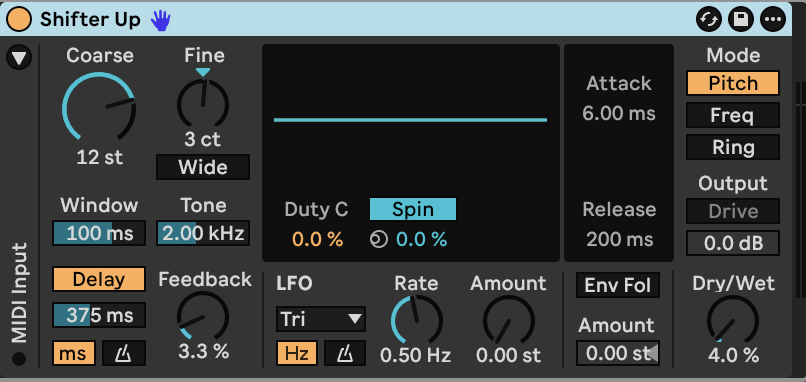
Place **Shifter** after Drift. Use **Pitch** mode with **Internal** pitch control.
| Control | Value |
|---|---:|
| Coarse | +12 st |
| Fine | +3 ct |
| Window | 100 ms |
| Delay | On |
| Delay Sync | Off |
| Delay Time | 375 ms |
| Feedback | 3.3% |
| Tone | 2.00 kHz |
| Dry/Wet | 4.0% |
Keep **Wide Off**, **Env Fol Off** and both LFO amount controls at **0**. The delayed octave adds a faint halo above the main tone. The small detuning prevents it from sitting perfectly on top of the original harmonic structure. Tone darkens successive repeats.
[Play or download step 2 — WebM](audio/steps/step-02.webm)
## Step 3 — Add a lower-octave echo
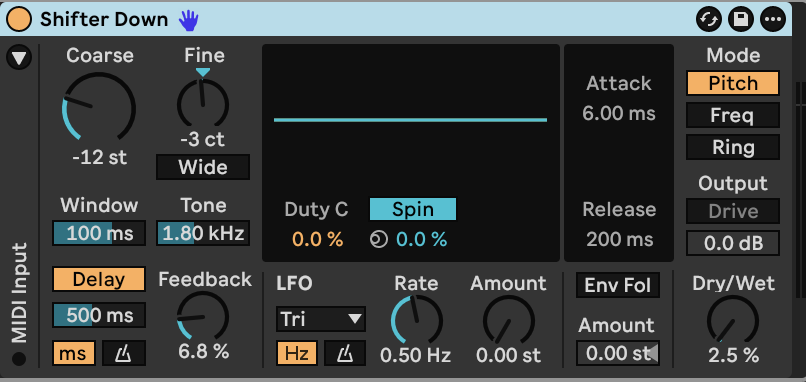
Add a second **Shifter** after the first. Again use **Pitch** mode and **Internal** pitch control.
| Control | Value |
|---|---:|
| Coarse | −12 st |
| Fine | −3 ct |
| Window | 100 ms |
| Delay | On |
| Delay Sync | Off |
| Delay Time | 500 ms |
| Feedback | 6.8% |
| Tone | 1.80 kHz |
| Dry/Wet | 2.5% |
Keep **Wide Off**, **Env Fol Off** and both LFO amount controls at **0**. This quieter, slower echo fills in the octave below the singing filter. Because the Shifters are in series, this stage receives both the main tone and the first stage's upper echo.
[Play or download step 3 — WebM](audio/steps/step-03.webm)
## Step 4 — Surround the tone with a dark room
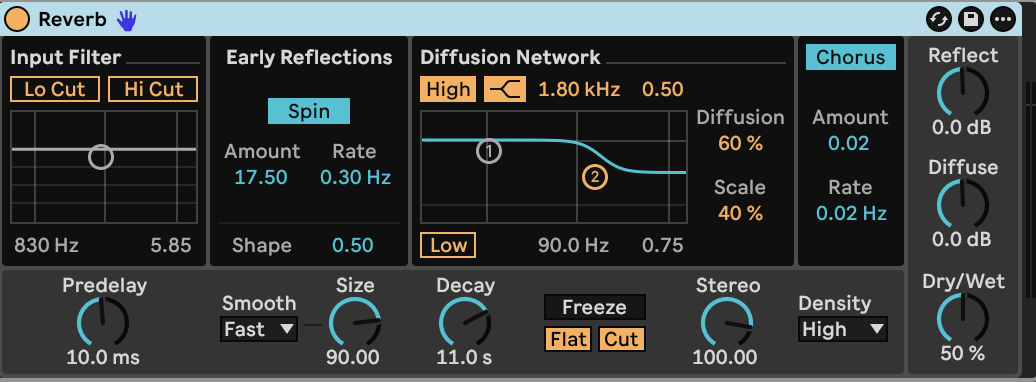
Place **Reverb** after the second Shifter.
| Control | Value |
|---|---|
| Predelay | 10.0 ms |
| Size / Smoothing | 90.00 / Fast |
| Decay | 11.0 s |
| Stereo | 100.00 |
| Density | High |
| Dry/Wet | 50% |
| Input Lo Cut / Hi Cut | Off / Off |
| Reflect / Diffuse level | 0 dB / 0 dB |
| Spin | On, 0.30 Hz, Amount 17.50 |
| Early-reflection Shape | 0.50 |
| Diffusion High | On, Shelf, 1.80 kHz, Gain 0.50 |
| Diffusion Low | Off |
| Diffusion / Scale | 60% / 40% |
| Chorus | On, 0.02 Hz, Amount 0.02 |
| Freeze | Off |
The long reverb connects the drifting voices and octave echoes. High-frequency damping softens the tail as it decays.
[Play or download step 4 — WebM](audio/steps/step-04.webm)
Hold a note to let the swell and shifting pitch relationships develop. Short touches produce quieter wisps; overlapping notes let the releases and octave echoes blend. A lighter touch lowers the tone through the velocity response.
## Settings and sound
- [Finished sound — WebM](audio/Resonant-Octave-Mist.webm)
- [Complete instrument and effect settings](ALL_PARAMETERS.md)
- [Drift starting settings](STARTING_STATE.md)
- [Build guide — Markdown](BUILD_GUIDE.md)
[Ableton Drift reference](https://www.ableton.com/en/manual/live-instrument-reference/#drift) · [Ableton Shifter reference](https://www.ableton.com/en/manual/live-audio-effect-reference/#shifter)