# Build a Resonant Pulse Lead in Ableton Live
Build a dark, saturated lead with a sharp filter contour, slow flanging and trailing echoes. Use **Analog → Saturator → Phaser-Flanger → Echo** in **Live 12 Suite**.
[Play or download the finished sound](audio/Resonant-Pulse-Lead.webm) · [Complete settings](ALL_PARAMETERS.md)
## Step 1 — Combine two pulse waves
Load **Analog** in **Live 12 Suite**. The [starting settings](STARTING_STATE.md) collect the controls for this first step. Enable Osc1, Osc2 and Amp1. Route both oscillators entirely to **F1**, set **F1 To F2 0%**, and keep **Filter 2, Amp2, Noise, Unison, Glide, LFO1 and LFO2 Off**. Leave Filter 1 Off for this first step.
| Oscillator control | Osc1 | Osc2 |
|---|---:|---:|
| Shape | Rect | Rect |
| Pulse Width | 25% | 25% |
| Octave / Semitone | 0 / 0 st | 0 / 0 st |
| Detune, displayed value | 0.00 | −0.02 |
| Level | −6.0 dB | −6.0 dB |
| F1/F2 balance | F1 | F1 |
| Key tracking | 100% | 100% |
| Sub/Sync mode / Level | Sub / 0% | Sub / 0% |
| Pitch envelope amount | 0% | 0% |
| Pitch and pulse-width LFO amounts | 0 | 0 |
The 25% pulse width adds even as well as odd harmonics. The slight detuning creates movement between the two oscillators. Detune uses Analog’s displayed units; do not enter −0.02 cents.
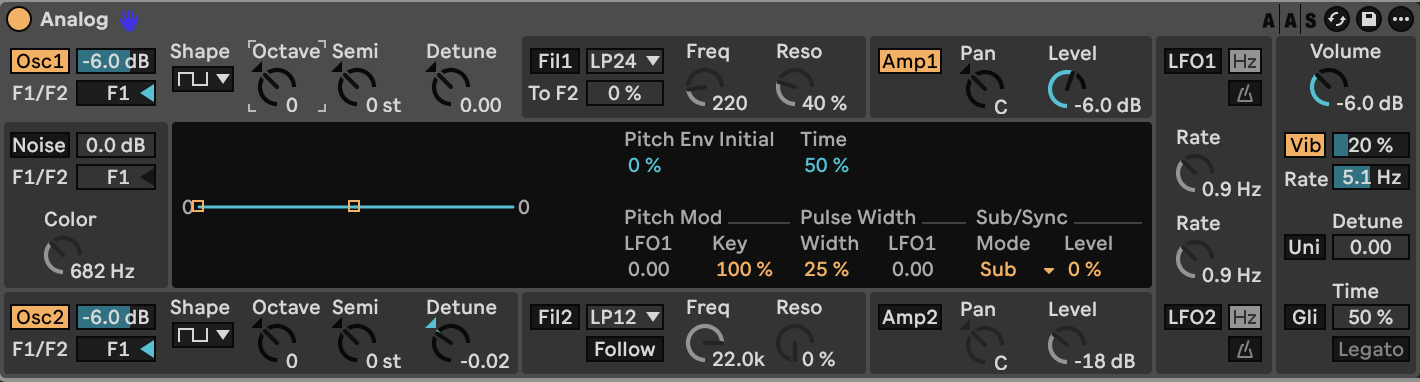
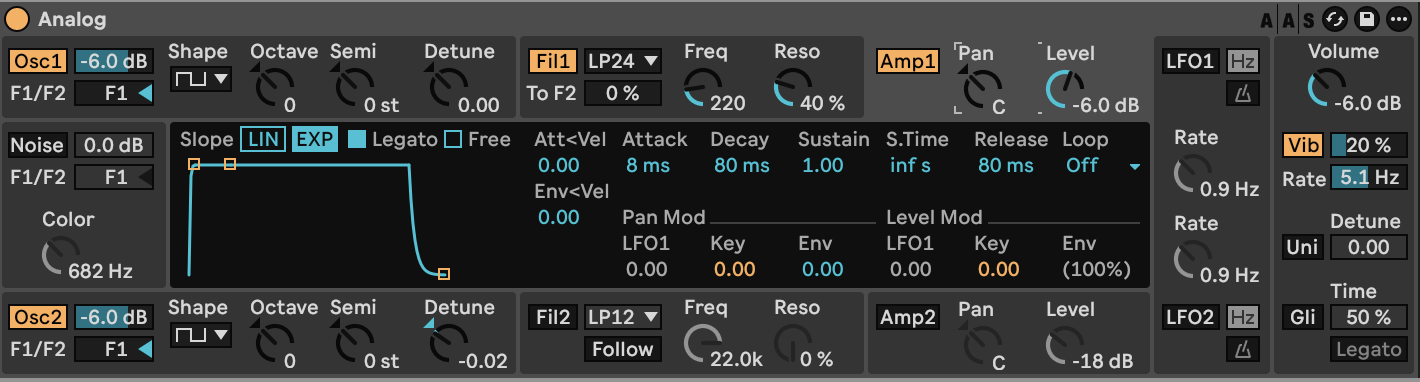
Set **Amp1 Level −6.0 dB**, its pan to center, and Analog’s global **Volume −6.0 dB**. Keep amplifier key and LFO modulation at zero. Set the Amp1 envelope to:
| Amplitude envelope control | Value |
|---|---|
| Attack | 8 ms |
| Decay | 80 ms |
| Sustain | 1.00 |
| Sustain Time | inf s |
| Release | 80 ms |
| Slope | EXP |
| Legato | On |
| Free / Loop | Off / Off |
| Attack and envelope velocity amounts | 0.00 |
With sustain at its maximum, the amplitude stays steady while a note is held. The short release leaves room for the echoes added later.
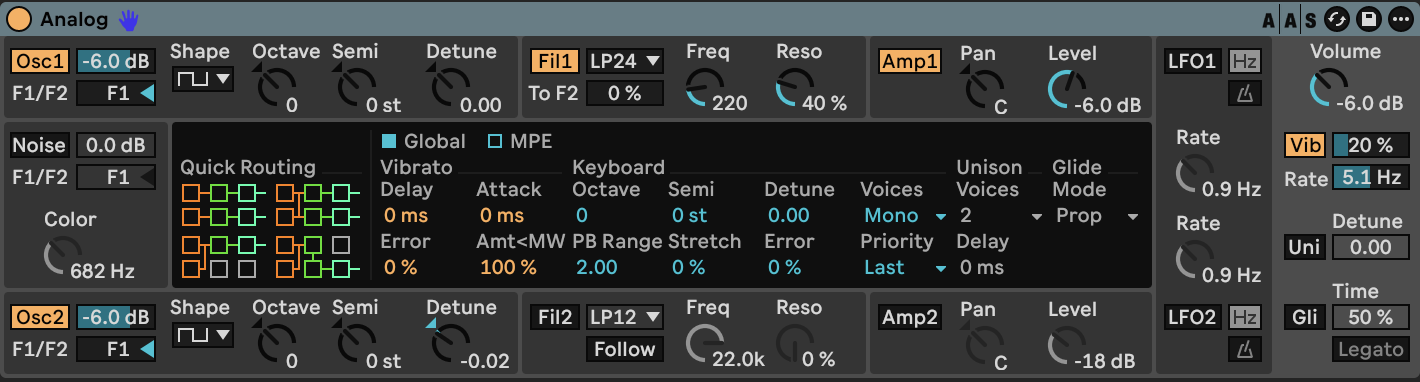
Set **Voices Mono**, **Priority Last**, global **Octave 0**, **Semitone 0**, **Detune 0.00**, **Stretch 0%**, **Error 0%**, and pitch-bend range **2.00**. For mod-wheel vibrato, enable **Vib**, set Amount **20%**, Rate **5.1 Hz**, and **Amt < MW 100%**. Keep vibrato Delay, Attack and Error at zero.
[Play or download step 1](audio/steps/step-01.webm)
## Step 2 — Add the resonant filter contour
Enable **Filter 1** and choose **LP24**. Set cutoff to **220 Hz**, Resonance **40%**, Drive **Off**, **Freq Mod Key 1.00**, and **Freq Mod Env 2.60**. Keep filter LFO modulation and all resonance modulation at zero. Leave **F1 To F2 0%**.
| Filter envelope control | Value |
|---|---|
| Attack | 5 ms |
| Decay | 143 ms |
| Sustain | 0.48 |
| Sustain Time | inf s |
| Release | 143 ms |
| Slope | EXP |
| Legato | On |
| Free / Loop | Off / Off |
| Attack and envelope velocity amounts | 0.00 |
The filter opens briefly at the beginning of a note, then settles to a darker sustained tone. Resonance emphasizes the frequencies near the moving cutoff. Keyboard tracking keeps the filter contour related to the played pitch. Keep the cutoff, key tracking and envelope amount together as a group of settings.
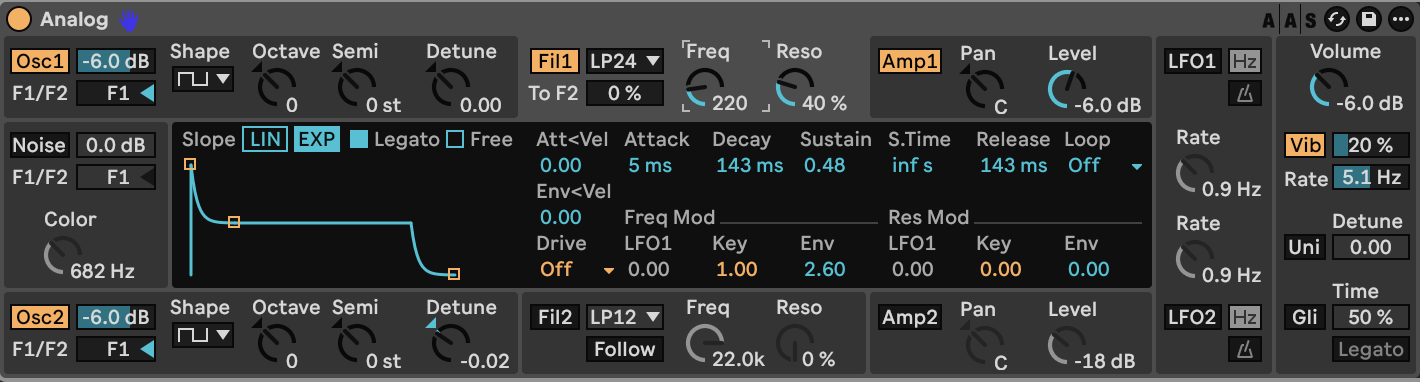
The following panels show the completed filter, amplitude and global settings:
[Play or download step 2](audio/steps/step-02.webm)
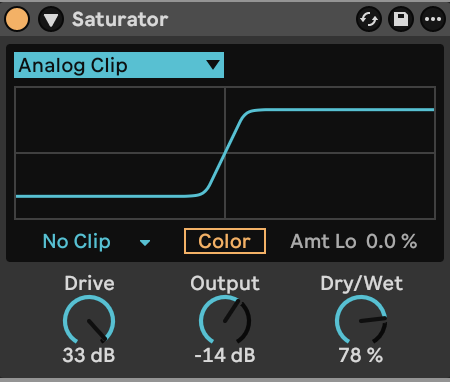
## Step 3 — Drive the sound into Saturator
Add **Saturator** after Analog.
| Saturator control | Value |
|---|---|
| Curve | Analog Clip |
| Drive | +33 dB |
| Output | −14 dB |
| Dry/Wet | 78% |
| Color | Off |
| DC filter | On |
| Output clip mode | No Clip |
| High Quality | On, in the device context menu |
The high Drive value compresses peaks and adds harmonics. Output reduces the level afterward, while the dry portion preserves some of the original envelope. Keep Analog’s oscillator, amplifier and global levels as specified: they determine how strongly Saturator is driven.
[Play or download step 3](audio/steps/step-03.webm)
## Step 4 — Add slow flanging and echoes
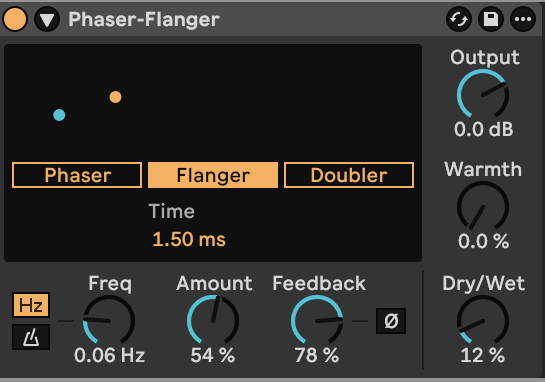
Place **Phaser-Flanger** after Saturator.
| Phaser-Flanger control | Value |
|---|---|
| Mode | Flanger |
| Time | 1.50 ms |
| LFO waveform / Rate | Sine / 0.06 Hz |
| LFO Sync | Off |
| Amount | 54% |
| Feedback | 78% |
| Feedback inversion | Off |
| LFO Phase | 180° |
| LFO Blend / Spin | 0% / Off |
| Envelope follower | Off |
| Warmth / Output | 0% / 0 dB |
| Dry/Wet | 12% |
The slow modulation moves the short delay through the sound, creating moving comb-filter peaks and notches. The low wet level keeps this movement behind the lead.
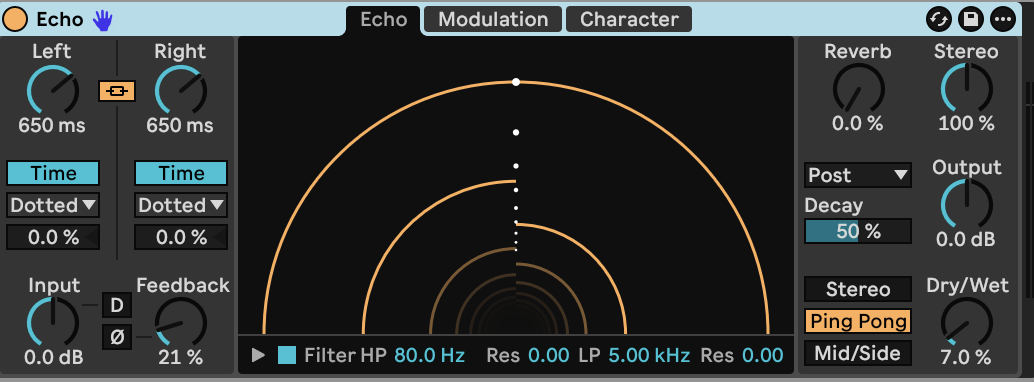
Add **Echo** last.
| Echo control | Value |
|---|---|
| Left / Right mode | Time / Time |
| Left / Right time | 650 ms / 650 ms |
| Link / Offsets | On / both 0% |
| Channel mode | Ping Pong |
| Feedback | 21% |
| Feedback inversion | Off |
| Dry/Wet | 7.0% |
| Filter | On |
| Highpass / Lowpass | 80.0 Hz / 5.00 kHz |
| Filter resonances | both 0.00 |
| Stereo width | 100% |
| Reverb | 0% |
| Input / Output | 0 dB / 0 dB |
| Repitch | On |
| Wobble | On, Amount 5.0%, Morph 0% |
| Noise / Gate / Duck / Clip Dry | Off |
| Delay and filter LFO modulation amounts | 0% |
The filtered echoes leave a quiet stereo tail. Wobble adds a small irregularity to the repeats. Echo’s inactive division menus can remain at their defaults when both channels are set to Time.
[Play or download step 4](audio/steps/step-04.webm)
The final signal order is **Analog → Saturator → Phaser-Flanger → Echo**.
Use detached notes to emphasize the filter attack. Overlap notes for smooth mono legato phrases; the amplitude and filter envelopes keep flowing between overlapping notes. Hold a note to expose the beating between the oscillators, and use the mod wheel to introduce vibrato. Higher notes shift the tracked filter upward along with the oscillators.
[Analog control reference](https://www.ableton.com/en/manual/live-instrument-reference/#analog) · [Phaser-Flanger and Echo reference](https://www.ableton.com/en/manual/live-audio-effect-reference/)
## Downloads and settings
- [Finished audio, WebM](audio/Resonant-Pulse-Lead.webm)
- [Complete device settings](ALL_PARAMETERS.md)
- [Starting settings](STARTING_STATE.md)
- [Markdown guide](BUILD_GUIDE.md)