# Build a Slow Harmonic Pad in Ableton Live
Build a slow, bright pad with a high ringing tone, a quieter cluster of lower harmonics and a wide chorus. Use **Operator → Chorus-Ensemble** in **Ableton Live 12 Suite**.
[Download the finished WebM](audio/Slow-Harmonic-Pad.webm) · [Read with audio players](/tutorials/slow-harmonic-pad/)
Follow the three steps in order. The [starting settings](STARTING_STATE.md) and [complete settings](ALL_PARAMETERS.md) collect the controls in one place.
## Step 1 — Draw the high ringing tone
Load **Operator** in **Live 12 Suite**.
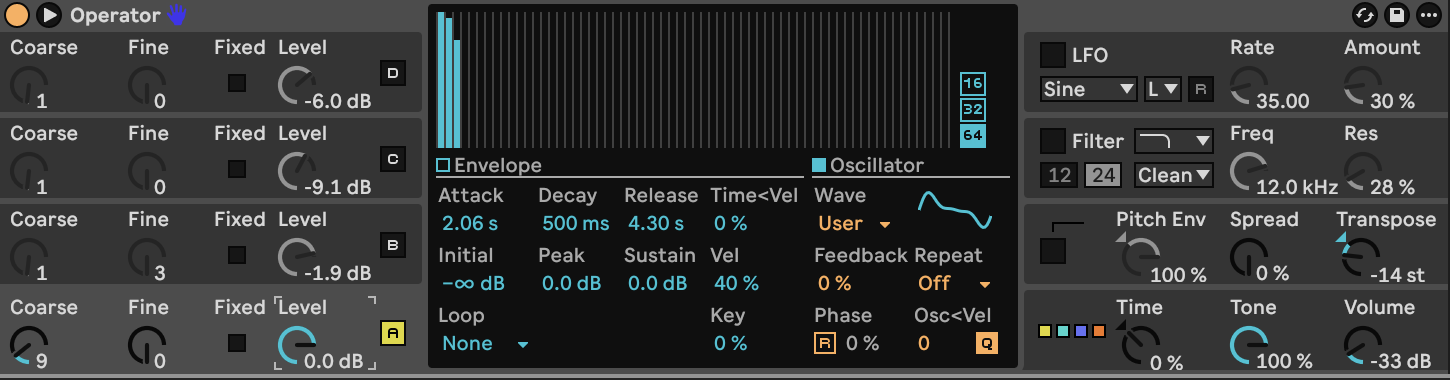
Click Operator’s lower-right global area. Choose **algorithm 11**, the far-right diagram with four oscillators side by side: each oscillator now goes directly to the output. Set **Voices 10**, global **Retrig Off**, interpolation and antialias **On**, Tone **100%**, Spread **0%**, Transpose **−14 st** and Volume **−33 dB**. Set Time, Time < Key, Pan < Key and Pan < Rnd to **0**. Leave velocity, aftertouch and mod-wheel connections Off in the global modulation matrix; set Key → Time to 0% and Pitch Bend → Pitch to **+2 st**.
Keep **Glide, Filter, Pitch Env and Shaper Off**. Switch **B, C, D and LFO Off** for this first step. The only active oscillator is A.
For each active oscillator, select **User** waveform, **64 harmonics**, **Repeat Off**, and turn **Normalize Off** in the harmonic editor’s context menu. Start with every partial cleared. Click **Oscillator** in the central display to draw the harmonic bars; click **Envelope** to adjust its shape. Each bar is one partial: bar 1 is the fundamental, bar 2 is twice its frequency, and so on. Use the partial-level readout while drawing; the values below are in dB relative to a full-height bar, not oscillator output levels.
Set **Fixed Off**, frequency quantization **On**, oscillator retrigger **Off**, Phase **0%**, Feedback **0%**, frequency/velocity modulation **0**, and level/key scaling **0%**. Leave oscillator pitch-envelope and LFO destination switches On; the global pitch envelope remains Off, and the LFO’s pitch amount will be zero.
Use envelope Initial and End **−∞ dB**, Peak and Sustain **0 dB**, Decay **500 ms**, Loop **None**, and time/release velocity scaling **0%**. Set the amplitude envelope slopes to **Attack 0%, Decay 100%, Release 0%**: the attack and release segments should be straight. Peak and sustain are equal, so the decay segment stays flat.
Set A to **Coarse 9**, **Fine 0**, **Level 0 dB**, **Attack 2.057 s**, **Release 4.300 s** and **Vel 40%**. Live rounds the displayed times to 2.06 s and 4.30 s.
Draw these three partials in A. Leave partials 4–64 Off.
| Partial | Level |
|---:|---:|
| 1 | 0.0 dB |
| 2 | −2.3 dB |
| 3 | −10.5 dB |
The high ratio gives the pad its ringing center; the other oscillators will fill in below it. At the audition note, A’s fundamental is approximately **1048 Hz**.
**Hear step 1:**
[Play or download step 1 WebM](audio/steps/step-01.webm)
## Step 2 — Add the lower harmonic layers
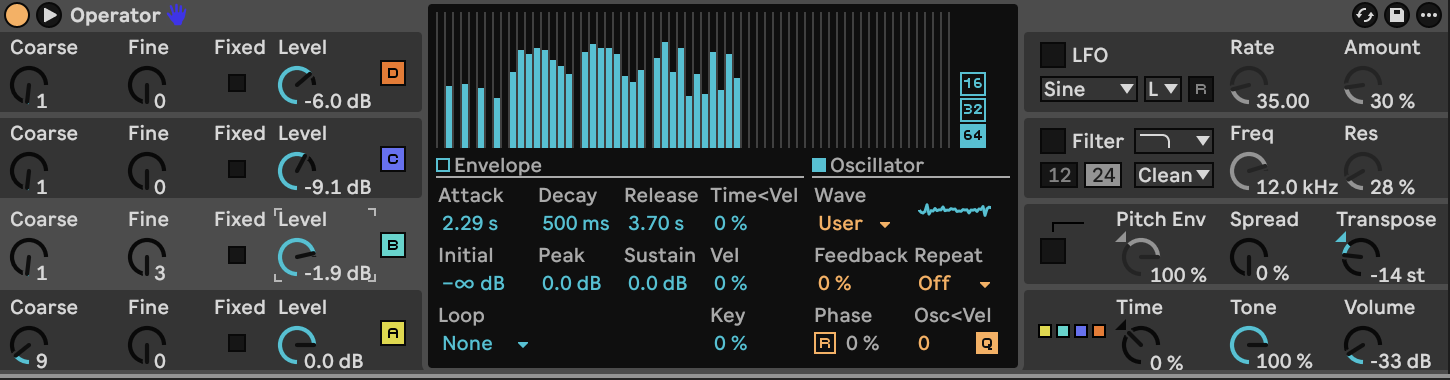
Enable **B, C and D**, using the common oscillator switches and envelope levels from step 1. Keep A unchanged and the LFO Off.
| Control | B | C | D |
|---|---:|---:|---:|
| Coarse | 1 | 1 | 1 |
| Fine, Operator units | 3 | 0 | 0 |
| Level | −1.9 dB | −9.1 dB | −6.0 dB |
| Attack | 2.294 s | 2.800 s | 2.380 s |
| Release | 3.700 s | 4.100 s | 4.000 s |
| Vel | 0% | 0% | 35% |
Draw their partials using the table below. B and C use the same spectrum; their different Fine settings and attack times add slow beating and a gradual change in tone. **Fine 3 is an Operator control value, not three cents.** D adds a quiet set of low odd harmonics.
Partial levels are separate from each oscillator’s **Level** knob. Leave every unlisted partial Off, including partials above 38. Keep Normalize Off so adding bars does not automatically reduce the other partials.
| Partial | A, dB | B, dB | C, dB | D, dB |
|---:|---:|---:|---:|---:|
| 1 | 0.0 | Off | Off | -18.4 |
| 2 | -2.3 | -26.7 | -26.7 | Off |
| 3 | -10.5 | Off | Off | -12.3 |
| 4 | Off | -25.7 | -25.7 | Off |
| 5 | Off | Off | Off | -11.9 |
| 6 | Off | -27.0 | -27.0 | Off |
| 7 | Off | Off | Off | -16.8 |
| 8 | Off | -30.5 | -30.5 | Off |
| 10 | Off | -21.8 | -21.8 | Off |
| 11 | Off | -14.0 | -14.0 | Off |
| 12 | Off | -15.5 | -15.5 | Off |
| 13 | Off | -13.1 | -13.1 | Off |
| 14 | Off | -13.9 | -13.9 | Off |
| 15 | Off | -17.3 | -17.3 | Off |
| 16 | Off | -19.7 | -19.7 | Off |
| 17 | Off | -22.2 | -22.2 | Off |
| 19 | Off | -14.3 | -14.3 | Off |
| 20 | Off | -11.5 | -11.5 | Off |
| 21 | Off | -13.1 | -13.1 | Off |
| 22 | Off | -13.3 | -13.3 | Off |
| 23 | Off | -15.3 | -15.3 | Off |
| 24 | Off | -23.1 | -23.1 | Off |
| 25 | Off | -24.8 | -24.8 | Off |
| 26 | Off | -21.0 | -21.0 | Off |
| 28 | Off | -16.6 | -16.6 | Off |
| 29 | Off | -10.8 | -10.8 | Off |
| 30 | Off | -21.8 | -21.8 | Off |
| 31 | Off | -13.1 | -13.1 | Off |
| 32 | Off | -29.8 | -29.8 | Off |
| 33 | Off | -22.4 | -22.4 | Off |
| 34 | Off | -29.2 | -29.2 | Off |
| 35 | Off | -14.8 | -14.8 | Off |
| 36 | Off | -27.6 | -27.6 | Off |
| 37 | Off | -15.5 | -15.5 | Off |
| 38 | Off | -23.7 | -23.7 | Off |
B and C fill the spaces between the stronger high harmonics. Their attacks are slightly slower than A’s, so the texture grows denser as the note opens.
**Hear step 2:**
[Play or download step 2 WebM](audio/steps/step-02.webm)
## Step 3 — Add slow modulation and stereo chorus
Enable **Operator’s LFO** and click its section to open the central controls.
| LFO control | Value |
|---|---|
| Wave / Range | Sine / Low |
| Rate | 35.00, as displayed |
| Amount | 30% |
| Retrigger | Off |
| Destination A amount, pitch | 0% |
| Destination B / Amount B | Volume / 60% |
| Rate < Key / Amount < Vel | 0% / 0% |
| Envelope Attack | 0.00 ms |
| Initial / Peak / Sustain / End | −∞ / 0 / 0 / −∞ dB |
| Envelope Decay / Release | 600 ms / 50.0 ms |
| Envelope Loop | None |
| Envelope time/release velocity scaling | 0% |
This introduces a gentle change in loudness. Keeping the pitch destination at zero avoids vibrato.
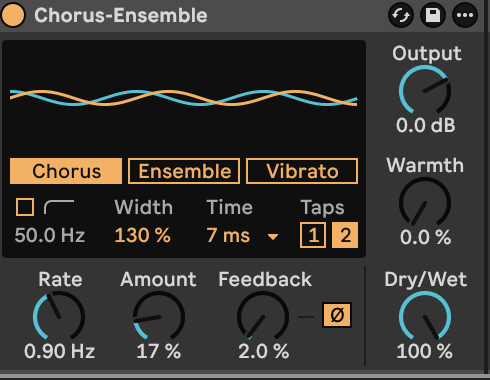
Add **Chorus-Ensemble** after Operator and set:
| Chorus-Ensemble control | Value |
|---|---|
| Mode | Chorus |
| Rate | 0.90 Hz |
| Amount | 17% |
| Feedback | 2% |
| Feedback inversion | On |
| Delay time | 7 ms |
| Delay taps | 2 |
| Width | 130% |
| High-pass filter | Off |
| Warmth | 0% |
| Output | 0 dB |
| Dry/Wet | 100% |
The short modulated delay spreads the pad across the stereo field without adding a long reverb tail.
**Hear step 3:**
[Play or download step 3 WebM](audio/steps/step-03.webm)
The final signal order is **four parallel Operator oscillators → Operator output with volume modulation → Chorus-Ensemble**. Keep Operator’s filter, pitch envelope and shaper Off.
Play **C2 / MIDI 48**, **C3 / MIDI 60** and **G3 / MIDI 67** at velocity 100, then try C3 at velocity **55**. Allow two to three seconds for the pad to open and roughly four seconds for the release. Short notes give a quieter, softer swell. Use single notes or widely spaced voicings to leave room for the high harmonics.
## Downloads and settings
- [Finished audio, WebM](audio/Slow-Harmonic-Pad.webm)
- [Complete device settings](ALL_PARAMETERS.md)
- [Starting settings](STARTING_STATE.md)
- [Markdown guide](BUILD_GUIDE.md)