# Build Submerged Pulse Horn in Ableton Live
A deep monophonic tone with a narrow pulse edge, a quiet upper harmonic, gentle filter movement and a wide, dark room tail.
Signal flow: **Wavetable → Saturator → Reverb → Utility**, using stock devices in Ableton Live 12 Suite. See the [complete settings](ALL_PARAMETERS.md) for every parameter.
[Finished sound — WebM/Opus](audio/Submerged-Pulse-Horn.webm)
## Step 1 — Balance the sub, pulse and upper harmonic
Begin with **Wavetable** in Ableton Live 12 Suite. The full chain is **Wavetable → Saturator → Reverb → Utility**; this first tone uses Wavetable alone. Use [starting settings](STARTING_STATE.md) for the complete static sound.
Enable both oscillators and the sub. Choose the **Basics** category for both main oscillators.
| Control | Oscillator 1 | Oscillator 2 |
| --- | --- | --- |
| Wavetable | Pulse PW | Basic Shapes |
| Position | 90% | 0% |
| Transpose | 0 st | +16 st |
| Detune | 0 ct | −14 ct |
| Gain | −8 dB | −21 dB |
| Pan | Center | Center |
| Effect mode | None | Modern |
| Modern Warp / Fold | Inactive | 30% / 0% |
Set **Sub Tone 0%**, **Gain 0 dB** and **Octave −1**. The sine sub supplies the main weight. Oscillator 1 adds a narrow pulse edge. Oscillator 2 starts from a sine wave; its tuning puts it close to five times the sub frequency. Warp adds harmonics to that quieter upper layer.
Use **Mono**, **Glide 0 ms**, **Unison None**, global **Transpose 0 st** and Wavetable **Volume 0 dB**. Unison amount and voice count do not affect the sound while unison is off.
Enable both filters with **Serial** routing:
| Control | Filter 1 | Filter 2 |
| --- | --- | --- |
| Type | Band-pass | Notch |
| Circuit | OSR | Clean |
| Slope | 12 dB | 12 dB |
| Frequency | 400 Hz | 805 Hz |
| Resonance | 0% | 85% |
| Drive | 3 dB | Inactive |
The band-pass shapes the low pulse body. The notch removes a narrow band of upper-mid energy, softening its harder edge.
Set **Amp Attack 24 ms**, **Decay 1.28 s**, **Sustain 0 dB** and **Release 3.30 s**. Use **Attack slope 0%**, **Decay and Release slopes 50%**, and **Loop None**. Full sustain keeps a held note present; the release leaves a fading direct tone after the key is released.
In the **MIDI** matrix set **Vel → Amp: 80**, **PB → Pitch: 2 st**, **Key → Flt 1 Freq: 70**, **Key → Flt 2 Freq: 100**, and **Press (aftertouch) → Flt 1 Freq: 8**. Velocity shapes amplitude, key tracking keeps the filter balance more consistent across the keyboard, and aftertouch opens the first filter slightly. Leave the mod wheel and other MIDI routes unassigned.
For this static first stage, use **Env 2 Peak 0%**, with Initial, Sustain and Final also at 0%. The envelope movement is introduced in step 2. Keep global modulation amount at 100% and Time at 0%.



[Hear step 1 — WebM/Opus](audio/steps/step-01.webm)
## Step 2 — Add a gentle filter contour
Set **Env 2 Attack 510 ms**, **Decay 1.81 s**, **Release 1.35 s**, **Initial 0%**, **Peak 100%**, **Sustain 0%** and **Final 0%**. Use **Attack slope 0%**, **Decay and Release slopes 50%**, and **Loop None**.
In **Matrix**, set **Env 2 → Flt 1 Freq: 8**. All other internal modulation routes remain zero; Env 3 and both LFOs are unassigned.
The small positive envelope amount lifts the band-pass frequency during the opening half-second, then lets it settle into a darker sustained tone. Short notes interrupt the contour; held notes reveal its full rise and fall.


[Hear step 2 — WebM/Opus](audio/steps/step-02.webm)
## Step 3 — Round the tone with saturation
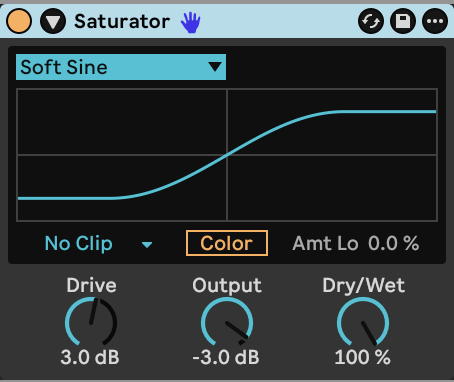
Place **Saturator** after Wavetable. Select **Soft Sine**, with **Drive 3 dB**, **Output −3 dB** and **Dry/Wet 100%**. Keep **Color off**, **DC filter off** and the output clipping mode at **No Clip**.
The soft curve rounds waveform peaks and changes the relationship between the low body and its upper harmonics. The output reduction balances the added drive.
[Hear step 3 — WebM/Opus](audio/steps/step-03.webm)
## Step 4 — Add the dark room and stereo width
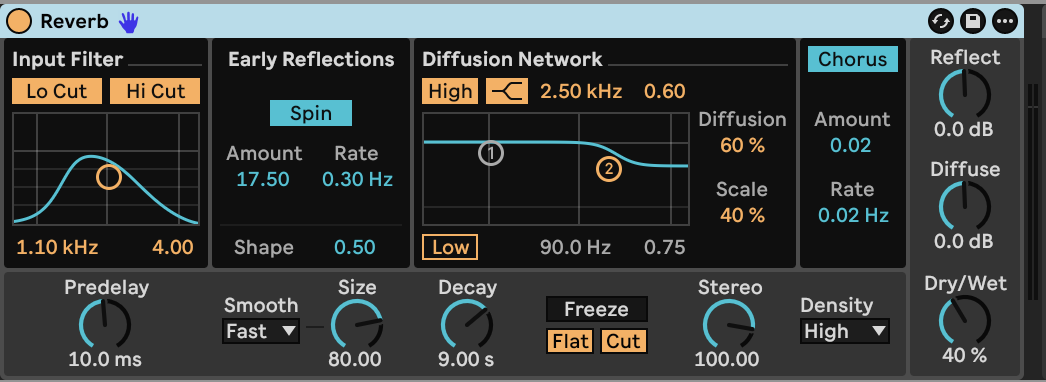
Follow Saturator with **Reverb**, then **Utility**.
| Reverb control | Value |
| --- | --- |
| Predelay | 10 ms |
| Input Lo Cut / Hi Cut | On / On |
| Input filter Frequency / Width | 1.10 kHz / 4.00 |
| Size / Smoothing | 80 / Fast |
| Decay | 9.00 s |
| Density | High |
| Stereo | 100 |
| Dry/Wet | 40% |
| Diffusion High | On, Shelf, 2.50 kHz, Gain 0.60 |
| Diffusion Low | Off |
| Diffusion / Scale | 60% / 40% |
| Reflect / Diffuse level | 0 dB / 0 dB |
| Spin | On, 0.30 Hz, Amount 17.50 |
| Early-reflection Shape | 0.50 |
| Chorus | On, 0.02 Hz, Amount 0.02 |
| Freeze | Off |
Filtering the reverb input reduces low-frequency buildup and keeps the direct sub clearer. High-frequency damping makes the room darker as it fades.
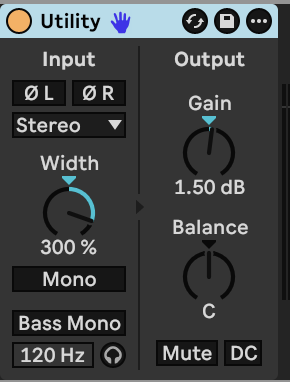
In **Utility**, choose **Stereo**, set **Width 300%** and **Gain +1.50 dB**, and keep Balance centered. Leave Mono, Bass Mono, phase inversion, Mute and DC Filter off. The wide setting brings out the room's side information; the dry centered body remains in the middle.
[Hear step 4 — WebM/Opus](audio/steps/step-04.webm)
Held notes expose the low body beneath the changing pulse colour. Short notes leave a softer, more spacious tail. Overlapping notes follow the monophonic voice, while velocity and aftertouch vary the weight and brightness.
## Downloads and settings
- [Complete instrument and effect settings](ALL_PARAMETERS.md)
- [Wavetable starting settings](STARTING_STATE.md)
- [Finished sound — WebM/Opus](audio/Submerged-Pulse-Horn.webm)
[Ableton Wavetable reference](https://www.ableton.com/en/manual/live-instrument-reference/#wavetable)