# Build Swelling Pulse Pad in Ableton Live
A warm, slowly opening polyphonic pad built with stock Ableton devices. Slightly different pulse shapes and detuning create movement; chorus spreads the body, EQ shapes its lower harmonics, and short filtered echoes soften the edge.
Use **Wavetable, Chorus-Ensemble, EQ Eight and Delay** in Ableton Live 12 Suite. Signal flow: **Wavetable → Chorus-Ensemble → EQ Eight → Delay**. The complete control values are in [All parameters](ALL_PARAMETERS.md).
[Play or download the finished sound — WebM/Opus](audio/Swelling-Pulse-Pad.webm)
## Step 1 — Shape the pulse-wave body
The signal flow is **Wavetable → Chorus-Ensemble → EQ Eight → Delay**. Load Wavetable and apply the [starting settings](STARTING_STATE.md), with both main oscillators on and the Sub off. Choose **Basics → Pulse PW** for both oscillators.
| Control | Oscillator 1 | Oscillator 2 |
|---|---|---|
| Position | 33% | 36% |
| Transpose | 0 st | 0 st |
| Detune | 0 ct | −7 ct |
| Gain | −6 dB | −9 dB |
| Pan | Center | Center |
| Oscillator effect | Modern: Warp 0%, Fold 0% | None |
Set global **Transpose −12 st**, **Poly 6**, **Classic Unison**, **3 unison voices**, **Amount 4%**, **Glide 0 ms** and device **Volume −11 dB**. The two pulse positions distribute harmonics differently; fine detuning and light unison introduce slow beating without a large pitch spread.
Enable **Filter 1** as a **24 dB low-pass**, **PRD** circuit, **1.36 kHz**, **Resonance 0%**, **Drive 0 dB**. Keep Filter 2 off and filter routing Serial.
| Envelope control | Amp | Env 2 |
|---|---|---|
| Attack | 1.95 s | 1.71 s |
| Decay | 2.10 s | 2.37 s |
| Sustain | 0 dB | 14% |
| Release | 2.40 s | 2.10 s |
| Attack slope | 0% | 0% |
| Decay / release slope | 50% / 50% | 50% / 50% |
| Loop mode | None | None |
For Env 2, use **Initial 0%**, **Peak 100%** and **Final 0%**. In **Matrix**, set **Env 2 → Flt 1 Freq: 25**. In **MIDI**, set **Key → Flt 1 Freq: 100**, **Vel → Amp: 50**, and **PB → Pitch: 2 st**. Key tracks the played note, Vel controls amplitude from velocity, and PB supplies pitch bend. Set every other modulation connection to zero. Leave global modulation amount at 100% and Time at 0%.
The amplitude envelope makes held notes bloom. The filter opens during the swell, then settles toward a softer sustained tone. Higher notes receive more filter opening, and stronger velocity raises the instrument output. Short notes end before the full swell develops.




[Hear step 1 — WebM/Opus](audio/steps/step-01.webm)
## Step 2 — Add slow chorus movement
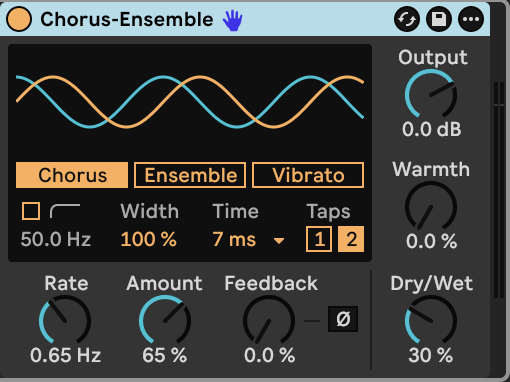
Follow Wavetable with **Chorus-Ensemble** in **Chorus** mode. Set **Rate 0.65 Hz**, **Amount 65%**, **Delay Time 7 ms**, **2 delay taps**, **Width 100%** and **Dry/Wet 30%**. Keep Feedback, Warmth, Shape and Offset at zero, high-pass off, and Output at 0 dB.
The delayed voices move around the sustained pulse tone, widening it and adding gentle pitch motion while the dry body remains prominent.
[Hear step 2 — WebM/Opus](audio/steps/step-02.webm)
## Step 3 — Balance the lower harmonics
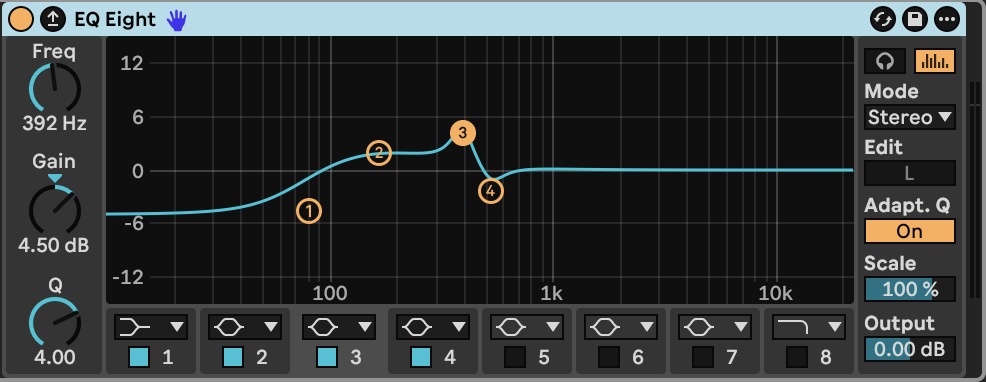
Follow the chorus with **EQ Eight** in **Stereo** mode, with **Oversampling off**. Enable bands 1–4 and disable bands 5–8.
| Band | Type | Frequency | Gain | Q |
|---|---|---|---|---|
| 1 | Low shelf | 75 Hz | −5 dB | 0.71 |
| 2 | Bell | 160 Hz | +2 dB | 0.80 |
| 3 | Bell | 392 Hz | +4.5 dB | 4.00 |
| 4 | Bell | 523 Hz | −2.5 dB | 4.00 |
Use **Scale 100%**, **Adaptive Q On**, and **Output 0 dB**. The low shelf restrains the deepest notes; the broad 160 Hz lift adds body. The narrower middle bands emphasize one region and soften another. These EQ frequencies stay fixed as notes change, giving different registers slightly different coloration.
[Hear step 3 — WebM/Opus](audio/steps/step-03.webm)
## Step 4 — Add a short, filtered stereo tail
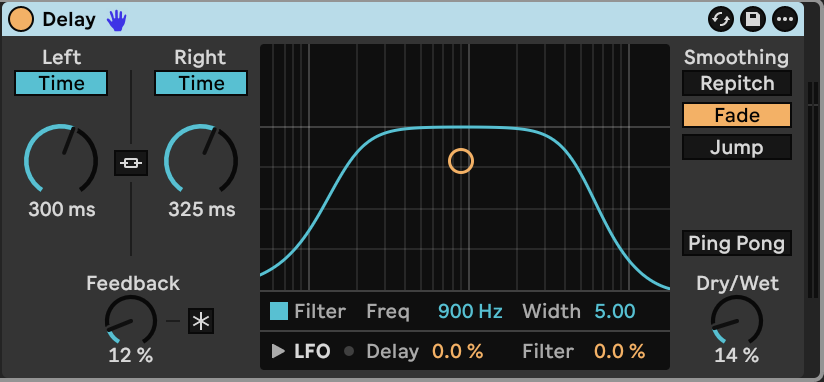
Finish with **Delay**. Turn **Link off**, use unsynced time controls, and set **Left 300 ms**, **Right 325 ms**, **Feedback 12%** and **Dry/Wet 14%**. Enable its filter at **900 Hz**, **Width 5.00**. Use **Fade** smoothing, with Ping Pong and Freeze off. Set both LFO modulation amounts to zero.
The unequal delay times spread the echoes across the stereo field. Low feedback keeps the repeats brief, while the filter makes them softer than the direct pulse tone.
[Hear step 4 — WebM/Opus](audio/steps/step-04.webm)
Hold notes to let the filter and amplitude swells develop. Short touches produce softer tones; overlapping notes let the releases and stereo echoes blend.
## Downloads and settings
- [Finished sound — WebM/Opus](audio/Swelling-Pulse-Pad.webm)
- [Complete instrument and effect settings](ALL_PARAMETERS.md)
- [Wavetable starting settings](STARTING_STATE.md)
- [Build guide — Markdown](BUILD_GUIDE.md)